Understanding Open Licensing
Legal Permission to Freely Use, Adapt, and Share
In Canada, authors automatically have copyright for the work they create, which lasts until the work enters the public domain. Copyright gives creators exclusive rights to reproduce, distribute, and adapt their work. This means you need permission to use someone else’s copyrighted material—even if it’s freely available online.
Open licensing provides that permission. Instead of requiring you to ask for permission each time, open licenses grant you legal rights in advance to use, modify, or share copyrighted content. This removes barriers and lets creators and educators focus on teaching and learning rather than navigating copyright restrictions.
Creative Commons (CC) licenses are the most common open licenses used in education. They work within copyright law to create clear, standardized permissions. When creators apply CC licenses to their work, they communicate which rights they reserve and which rights they waive. Each license is represented with a symbol that explains all the rights associated with the resource, making it easy to understand what you can and cannot do.

Understanding Copyright and User Rights
In Canada, copyright automatically applies to original works, giving creators exclusive rights to reproduce, distribute, perform, and adapt their work. These rights protect creators’ intellectual property and ensure they can benefit from their creative work.
For educators, copyright creates both protection and complexity. While fair dealing provisions allow some educational use, the boundaries can be unclear, and permissions for adaptation or redistribution are typically restricted.
How open licensing shares copyrights
Open licensing works within copyright law to solve this problem. When creators apply open licenses to their work, they share specific rights from their copyright bundle with you. Instead of keeping all rights exclusively, they grant you legal permission to:
These rights are explained more fully in the What are OERs toolkit. The power of open licensing is that it gives you explicit permission to exercise rights that are normally reserved exclusively for copyright holders.
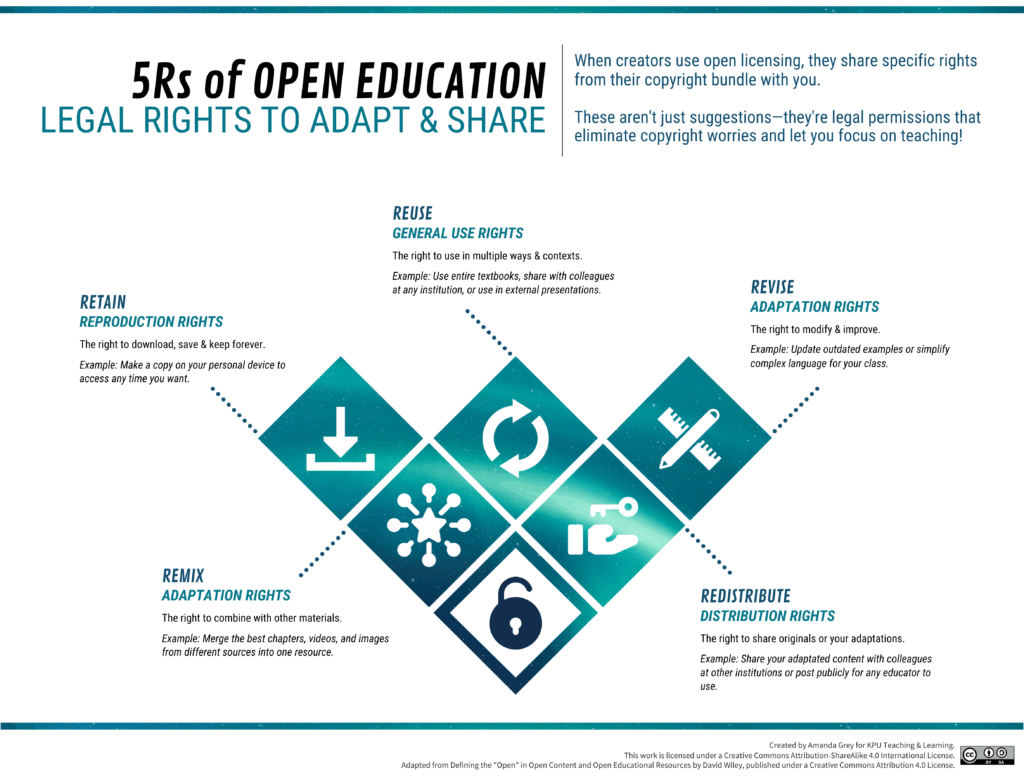
Creative Commons licenses formalize these permissions through six standardized licenses, each granting different combinations of rights.
Creative Commons Licenses
Creative Commons offers six licenses, each with different rights and conditions for use. All CC licenses require attribution, but they vary in what else they allow or restrict. These licenses are built from four basic elements that can be combined in different ways:
- BY (Attribution): Required for all CC licenses
- SA (ShareAlike): Adaptations must use the same license
- NC (NonCommercial): No commercial use allowed
- ND (NoDerivatives): No adaptations allowed
The licensing spectrum
These six licenses exist on a spectrum of openness. The more restrictions a license has, the fewer of the 5Rs you can exercise. The most open licenses allow all five activities with minimal conditions, while more restrictive licenses limit commercial use or prevent adaptations entirely.


This matters because more open licenses enable wider educational use and more opportunities for collaboration and improvement. When choosing a license for your own work, you’re deciding how open you want your resource to be.
The six licenses, from most open to least open
- CC BY
- CC BY-SA
- CC BY-NC
- CC BY-NC-SA
- CC BY-ND
- CC BY-NC-ND
Note that ShareAlike (SA) and NoDerivatives (ND) cannot be used together, since SA requires publishing adaptations while ND prohibits creating them.
In the following sections, we’ll explore what each license element means and how to choose which license to use.
Understanding Attribution (BY)
All Creative Commons licenses require attribution. This is the foundation of open licensing—creators share their rights with you, but they still deserve credit for their work.
Attribution (BY) requires you to give appropriate credit, provide a link to the license, and indicate if you made changes. You can do this in any reasonable manner, but not in any way that suggests that the original creator endorses you and your use.
The TASL format
Attribution in open education follows a TASL format: Title, Author, Source and License. When you use an openly licensed work, this is the information you need to include to fulfill the attribution requirement.
What is the name of the material?
If a title was provided for the material, include it. Sometimes a title is not provided; in that case, don’t worry about it.
Who owns the material?
Name the author or authors of the material in question. Sometimes, the licensor may want you to give credit to some other entity, like a company or pseudonym. In rare cases, the licensor may not want to be attributed at all. In all of these cases, just do what they request.
Where can I find it?
Since you somehow accessed the material, you know where to find it. Provide the source of the material so others can, too. Since we live in the age of the Internet, this is usually a URL or hyperlink where the material resides.
How can I use it?
You are obviously using the material for free thanks to the CC license, so name and provide a link to it.
If the licensor included a license notice with more information, include that as well.
To see examples of attribution, use the slider on the image below and see how the attribution underneath changes.
No need to make it complicated
You can satisfy attribution requirements in any reasonable manner based on the medium, means, and context. For example, it may be reasonable to provide a link to a webpage that includes all the required information, or to include attribution in a credits section or footnote.
There’s no one right way—just make sure your attribution is reasonable and suited to the medium you’re working with. That said, you still have to include attribution requirements somehow, even if it’s just a link to an About page that has that info.
Additional considerations
When you access material originally, did it come with copyright notices, disclaimers of warranties, or notices of previous modifications? Best practice is to retain all of that information by copying and pasting such notices into your attribution. Don’t make it more complicated than it is—just pass on any info you think is important to future users.
This content was adapted from the Introduction to Open Educational Resources by Amanda Grey, licensed under a Creative Commons Attribution 4.0 International License.
Resources
Additional License Conditions (SA, NC, ND)
In addition to the Attribution requirement, there are three other conditions that creators can choose to add to their license. These conditions determine what restrictions, if any, apply to how you can use and share the work.
Share-Alike (SA)
People who want to adapt and then publish their adaptation must publish it with the exact same license that you chose. This limitation ensures that your work stays in the open all the way down the line.
Why choose ShareAlike?
This condition protects openness by preventing others from taking your openly licensed work, adapting it, and then releasing it under more restrictive terms. It’s popular in educational contexts where you want to ensure ongoing access and collaboration.
What to know
ShareAlike can create license compatibility issues when remixing materials with different licenses. If you want to combine content from multiple sources, all materials need compatible licenses.
NonCommercial (NC)
People can’t use your resource for a money-making endeavor. They are allowed to recover costs (e.g. charging for print services) but cannot make a profit.
Why choose NonCommercial?
This condition prevents commercial publishers or for-profit companies from using your work without permission. Some creators choose this to maintain control over commercial applications of their work.
What to know
“Commercial use” can be ambiguous. Is use at a tuition-charging university commercial? What about conference presentations with registration fees? The NC restriction can limit educational use more than intended and may reduce the reach and impact of your work
No Derivatives (ND)
People who adapt or modify your work cannot publish it. They can still download, use, and share your work as-is, but they cannot create and share adapted versions.
Why choose NonCommercial
Why choose NoDerivatives?
This condition is useful when you want your work shared exactly as you created it—perhaps to protect the integrity of specific content, preserve carefully designed pedagogy, or maintain quality control.
What to know
ND is the most restrictive condition because it eliminates three of the 5Rs (Revise, Remix, and Redistribute adaptations). While people can still use your work, they cannot customize it for their specific teaching context or student needs.
How these combine
These three conditions (plus the Attribution requirement) can be mixed and matched together to create the six licenses. Note that ShareAlike and NoDerivatives cannot be used together, since ShareAlike requires publishing adaptations while NoDerivatives prohibits creating them.
You don’t have to apply the same license to every part of a resource. It’s possible—and sometimes preferable—to use different licenses for different components. For example, you might license an entire textbook as CC BY-SA to encourage adaptation and collaboration, but choose CC BY-ND for a specific chapter that contains stories from marginalized communities, where you want to protect the integrity and context of those narratives.
When using mixed licensing, clearly indicate which license applies to which parts of the work. This transparency helps users understand what they can and cannot do with different sections.
When you add conditions to your license, you’re balancing openness with control. More restrictive licenses may protect certain interests but can limit educational use, reduce opportunities for collaboration and improvement, and decrease the overall impact of your work in the educational community.
Further Reading
Other Open Licenses
While Creative Commons are the most common open licenses used in open education work, there are several other open licenses that you may find during your search for materials to use. They are letting you use their work, but will have their own set of requirements. Be sure to read the terms and conditions page to make sure you are following the rules for use.
Examples of other Open Licenses
- Canada Open Government Licence – Access information that is disclosed as part of the federal government’s commitment to enhance accountability and transparency.
- Unsplash License – Download, copy, modify, distribute, perform, and use photos.
- Pixabay License – Use, modify, or adapt images, videos, music, etc.
- TimeMaps – Not a “license” but the terms and conditions allow for the reproduction of images, maps, text and other resources for non-commercial purposes only and with specific attribution requirements.
When you encounter non-CC open licenses, always review their specific terms to understand what permissions are granted and what restrictions apply.