Instructional design is at the heart of effective teaching and learning, bridging the gap between educational goals and meaningful student experiences. A well-designed instructional approach ensures that learning activities, materials, and assessments are intentional, inclusive, and adaptable to meet the needs of diverse learners. Grounded in evidence-based practices, instructional design includess various frameworks and models, considers the impact of different delivery modalities, and leverages open educational resources and pedagogy to enhance accessibility and engagement.
Adopting a Universal Design for Learning (UDL) perspective is critical in creating inclusive learning environments. UDL’s focus on multiple means of engagement, representation, and action and expression encourages flexibility and creativity in instructional activity design, fostering learner success and the development of expert learners. This section explores the essential components of instructional design delivery, providing practical strategies and insights to support educators in creating transformative learning experiences for all students.
For a podcast-style audio overview of the entire Instructional Delivery Design section, please listen below (captioning available and transcript downloadable under the player):
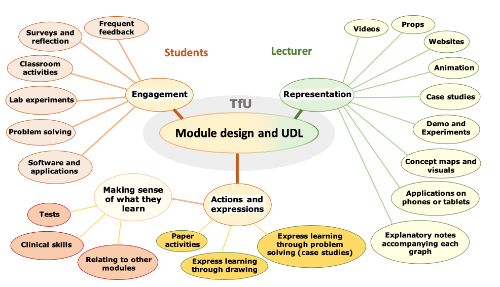
This diagram illustrates just some of the examples of how UDL principles shape instructional design by emphasizing Engagement, Representation, and Action and Expression as the foundation of inclusive, learner-centered education (CIRTL, 2024). These interconnected elements reflect the flexibility and adaptability required to meet diverse student needs. Engagement strategies like lab experiments, problem-solving, and reflections address motivation and active participation. Representation focuses on presenting information through varied formats, such as videos, animations, and case studies, ensuring accessibility for all learners. Finally, Action and Expression emphasizes providing students with multiple pathways, such as drawing or problem cases, to demonstrate their knowledge. This holistic approach to instructional design exemplifies how UDL principles create equitable, effective, and meaningful learning experiences.
“Module design and UDL” by University of College Cork, Centre for Integration of Research, Teaching and Learning (CIRTL). Adapted for KPU (2024).
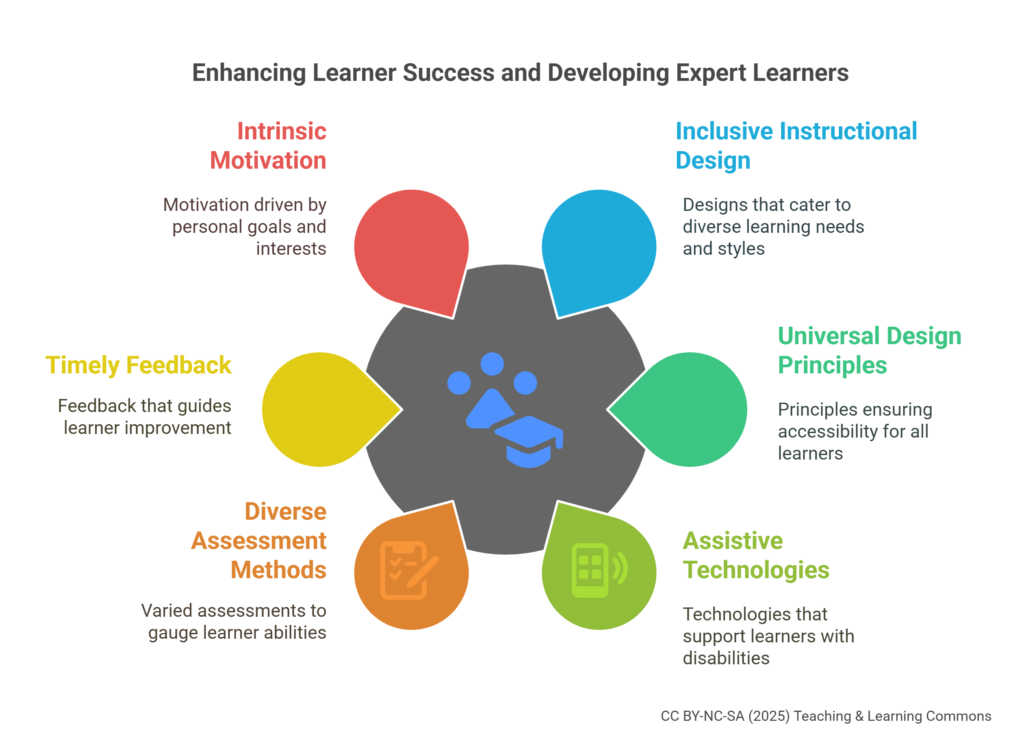
At the heart of designing and developing instructional activities and delivery is the commitment to fostering learner success and cultivating expert learners. These goals drive the application of evidence-based practices like Universal Design for Learning (UDL), ensuring all students, regardless of background, ability, or learning preferences, can access and engage meaningfully with educational content. By emphasizing inclusivity, flexibility, and adaptability, UDL empowers educators to create learning environments that support diverse needs and remove barriers to achievement.
Learner success in higher education relies on quality and inclusive instructional design. This framework ensures all students, regardless of learning style or ability, access educational opportunities that promote engagement, understanding, and practical knowledge application (Rose & Meyer, 2002). Effective design provides multiple ways of acquiring information, catering to diverse learning preferences. This includes offering content through written text, audio, and visual aids, ensuring accessibility for all students, including those with disabilities. Applying universal design principles and integrating assistive technologies helps eliminate learning barriers (CAST, 2018). Allowing varied demonstrations of understanding, such as essays, exams, presentations, and projects, accurately gauges diverse abilities (He & Baud, 2020). Timely, formative feedback fosters a growth mindset, while academic support resources like tutoring and mentoring facilitate continuous development (Nicol & Macfarlane-Dick, 2006). Engaging students involves connecting content to personal goals and real-world applications. Techniques like problem-based learning and collaborative projects enhance motivation (Mayer, 2008). Creating a community within the learning environment promotes collaboration and peer support, reinforcing content understanding and developing interpersonal skills (Johnson, Johnson, & Smith, 2014). Integrating these principles into instructional design fosters an inclusive, flexible, and engaging learning environment, enhancing learner success and fulfilling higher education goals.
Expert learners in higher education excel at acquiring, applying, and integrating knowledge (Zimmerman, 2002). They self-regulate their learning, adapt to diverse environments, and continuously seek improvement (Bransford, Brown, & Cocking, 2000). Instructional design plays a pivotal role in nurturing these learners by offering varied means of representation tailored to different learning needs and ensuring accessibility through universal design principles and assistive technologies (Rose & Meyer, 2002; CAST, 2018). Assessment methods should be diverse to accurately gauge learners’ abilities, including exams, presentations, and practical projects. Providing varied assessments fosters growth by offering timely, formative feedback, enabling learners to recognize strengths and areas for improvement (He & Baud, 2020; Nicol & Macfarlane-Dick, 2006). A growth mindset, as researched by Carol Dweck, emphasizes that talents can be developed through effort and strategy, which leads to greater achievement compared to a fixed mindset (Dweck, 2006). Instructional design should encourage learners to view challenges as opportunities for growth, aiding in the development of expert learners. Intrinsic motivation and real-world application are crucial for engagement; techniques like problem-based learning and collaborative projects are particularly effective (Mayer, 2008). Creating a community within the learning environment fosters collaboration and peer support, which are essential for content understanding and skill development (Johnson, Johnson, & Smith, 2014). Integrating these principles into instructional design fosters an inclusive, flexible, and engaging learning environment, significantly enhancing the potential for developing expert learners and achieving higher education goals.
Instructional design frameworks and models support educators in providing a methodical approach to designing learning experiences for their students, whether it be a part of their course design, instructional activities, and/or assessment designs. Though no one model or framework is better than the other, the following six (including two that are specific to technology) offer a great starting point for instructors, that also supports the principles of UDL.
As is the case with constructive alignment, one of the byproducts of instructional design is in providing clarity through the intentional planning of an educational experience (such as a course or assessment). For example, models like ADDIE and Backward Design encourage instructors to start with clear learning outcomes and systematically design materials (Ertmer & Quinn, 2007; Wiggins & McTighe, 2005). This clarity benefits both instructors and learners. Additionally, technology integration is emphasized by models like SAMR and TPACK, which emphasize integration over simple substitution (e.g., replacing print readings with digital versions) and explore transformative uses of technology (Puentedura, 2006). Leveraging tech tools enhances engagement and accessibility which are both core principles of UDL. Furthermore, motivation and engagement are central to the ARCS model, which nicely aligns and support the principles of UDL. By capturing learners’ interest, connecting content to real-world contexts, building confidence, and ensuring satisfaction, instructors create motivating learning experiences (Keller, 1987).
Regardless of which model or framework you choose, as with UDL, the goal is to deliberately design and account for how to represent information (providing multiple means of representation), engage learners (offering varied activities), and allow for diverse modes of expression (designing assessments that accommodate all learners) (Mishra & Koehler, 2006). By intentionally integrating UDL principles, instructors create more equitable and effective learning experiences for all students.
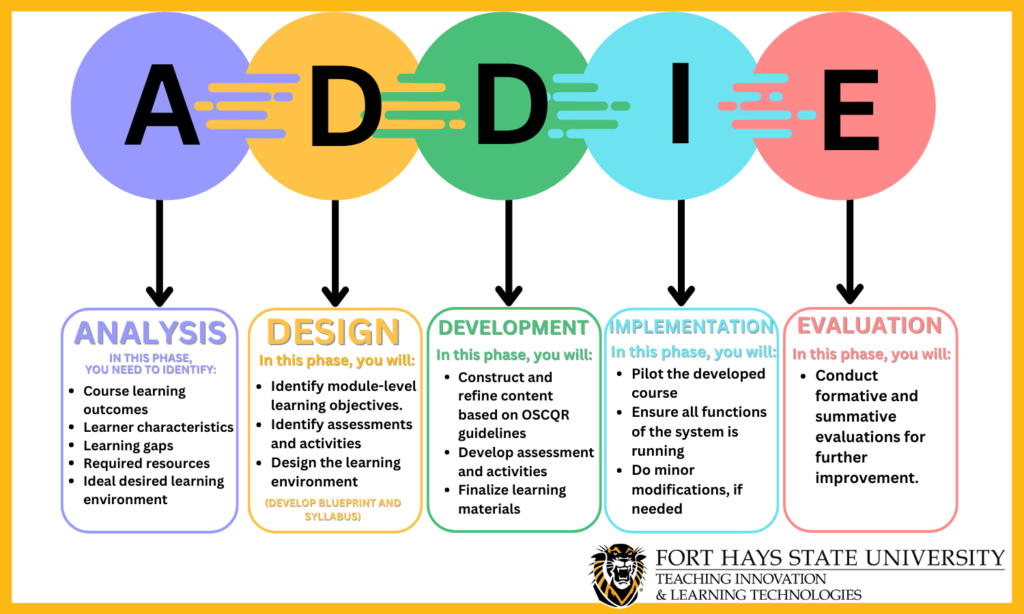
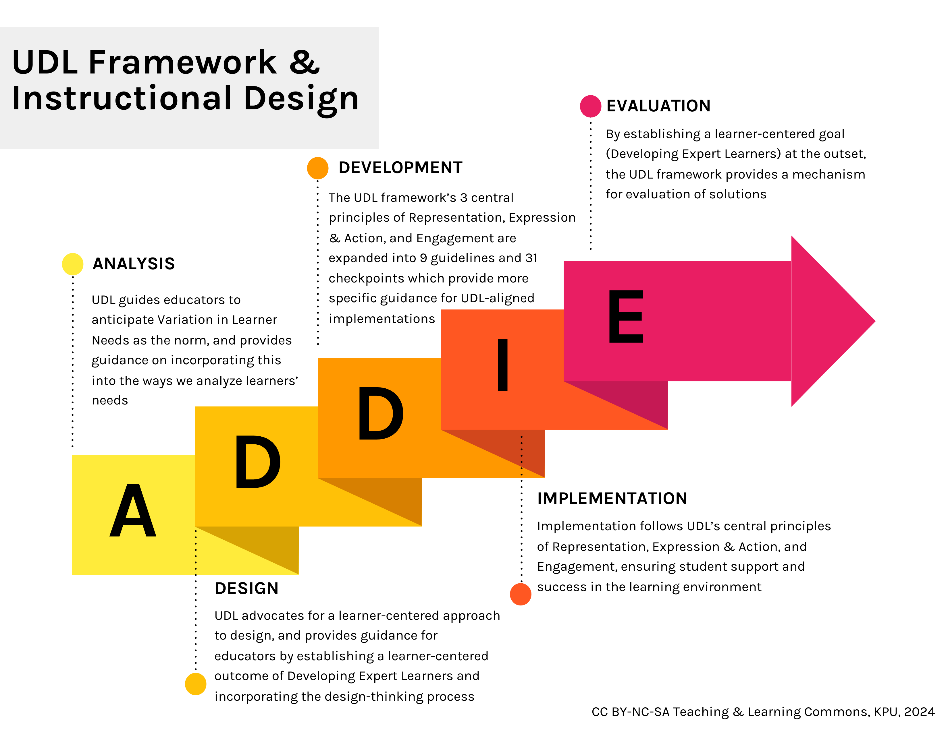
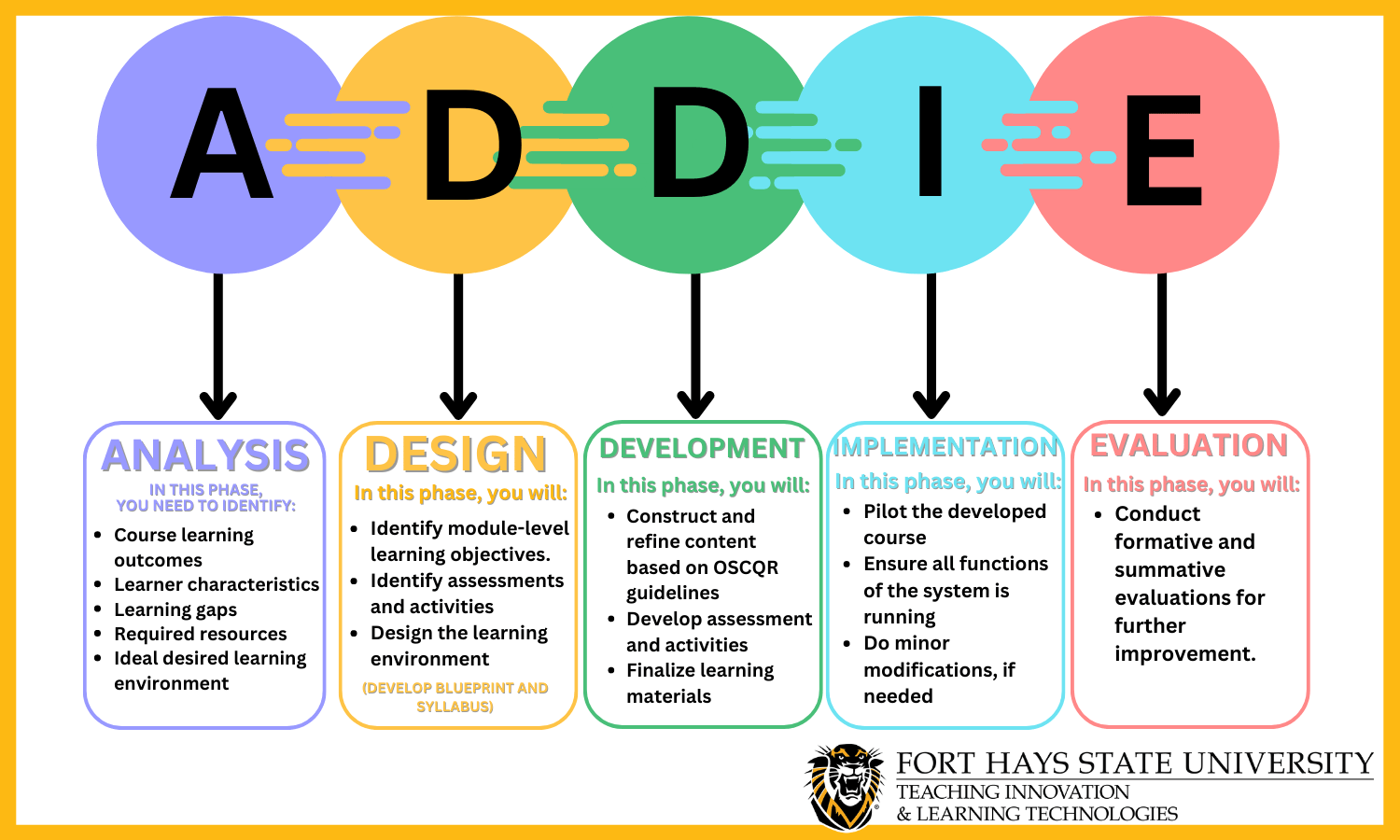
The ADDIE model is a systematic approach to designing instruction. It involves five stages: analysis, design, development, implementation, and evaluation (Ertmer & Quinn, 2007). During analysis, instructors identify learner needs, preferences, and potential barriers. In the design phase, they create learning materials that cater to diverse modalities, ensuring multiple means of representation. Development focuses on building content that accommodates various learning styles, such as visual, auditory, or kinesthetic. Implementation involves delivering instruction through flexible formats (e.g., videos, interactive modules) to engage all learners. Finally, evaluation assesses the effectiveness of the design, allowing adjustments based on learner feedback.
“ADDIE” by Danielle Reilley (2023), Fort Hays State University. Retrieved from https://tigerlearn.fhsu.edu/course-development-process-the-addie-model/
Course Design During the analysis phase, instructors identify learner profiles, including diverse needs (Ertmer & Quinn, 2007). In the design phase, they create course materials that provide multiple means of representation (e.g., visual aids, audio transcripts). Development focuses on building accessible content (e.g., captioned videos, alt text for images). Implementation involves delivering instruction through flexible formats (e.g., synchronous and asynchronous options). Evaluation assesses both learning outcomes and accessibility features
ADDIE Course Design Examples
History Example
Analysis
Identify the learning needs of the students, such as understanding historical events, analyzing primary sources, and developing critical thinking skills.
Design
Plan lessons that include a variety of resources (e.g., textbooks, documentaries, primary source documents) to provide multiple means of representation.
Development
Create accessible content, such as captioned videos of historical documentaries and alt text for images of historical artifacts.
Implementation
Assess student learning through a variety of assessments, such as essays, presentations, and exams. They also gather feedback from students to improve the course design.
Evaluation
Assess student learning through a variety of assessments, such as essays, presentations, and exams. They also gather feedback from students to improve the course design.
Math Example
Analysis
Identify that students need to understand mathematical concepts, solve problems, and apply mathematical reasoning.
Design
Plan lessons that explain concepts through lectures, demonstrate problem-solving through examples, and provide practice problems for students.
Development
Deliver instruction through lectures, problem-solving sessions, and collaborative group work. They might also use technology to create interactive simulations for complex mathematical concepts.
Implementation
Assess student learning through quizzes, problem sets, and exams. They also gather feedback from students to refine the course design.
Evaluation
Assess student learning through quizzes, problem sets, and exams. They also gather feedback from students to refine the course design.
Assessment Design Instructors design assessments that accommodate diverse learners. For instance, they might offer alternative assessment formats (e.g., oral presentations instead of written essays) or provide extended time for completion. By aligning assessments with UDL principles, instructors ensure equitable opportunities for all students.
ADDIE Assessment Design Examples
Political Science Example
Analysis
Identify that students need to demonstrate their understanding of political theories and their ability to analyze political systems.
Design
Plan an essay assignment where students must analyze a specific political system using a political theory covered in the course.
Development
Create an assignment prompt that clearly outlines the expectations, provides a list of political theories that can be used, and includes a rubric for grading.
Implementation
Distribute the assignment prompt to the students, provides time for questions and clarifications, and sets a due date for the assignment.
Evaluation
Grade the essays based on the provided rubric, gives feedback to each student, and reflects on the effectiveness of the assignment based on the students’ performance and feedback. Grade the assessments based on the checklist and rubric, gives feedback to each student, and reflects on the effectiveness of the assessment based on the students’ performance and feedback.
Nursing Example
Analysis
Identify that students need to demonstrate their practical nursing skills and their ability to apply critical thinking in healthcare situations.
Design
Plan a clinical skills assessment where students must perform a specific nursing procedure on a mannequin while explaining their actions.
Development
Create a checklist of steps for the procedure and a rubric for grading that includes points for correct technique, safety measures, and explanation of actions.
Implementation
Schedule the assessments, provides all necessary materials, and observes each student performing the procedure.
Evaluation
Grade the assessments based on the checklist and rubric, gives feedback to each student, and reflects on the effectiveness of the assessment based on the students’ performance and feedback.
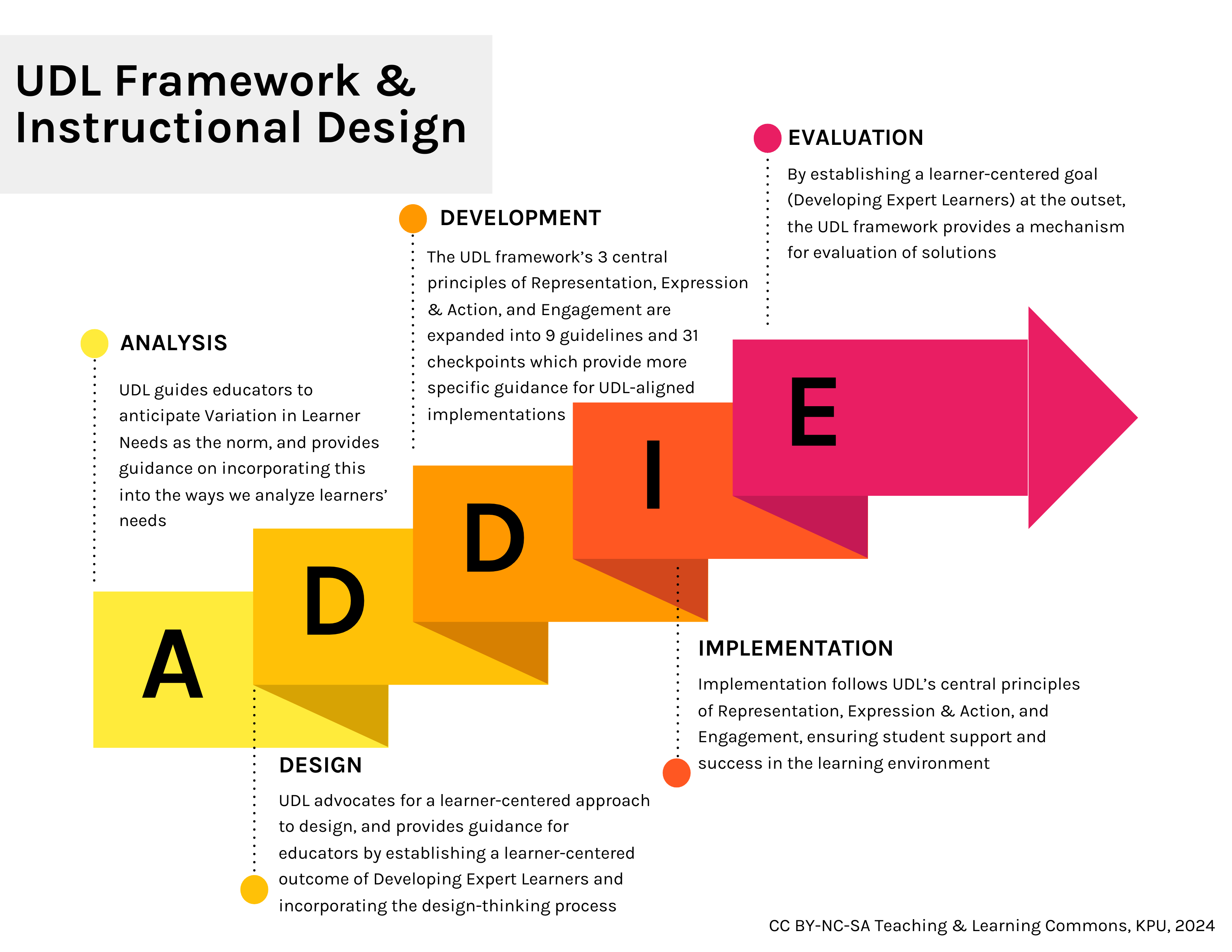
Example of how UDL fits in with each stage in ADDIE
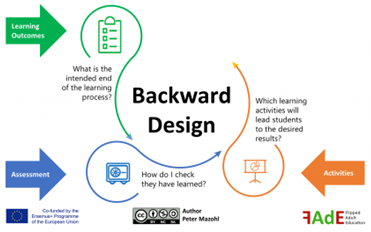
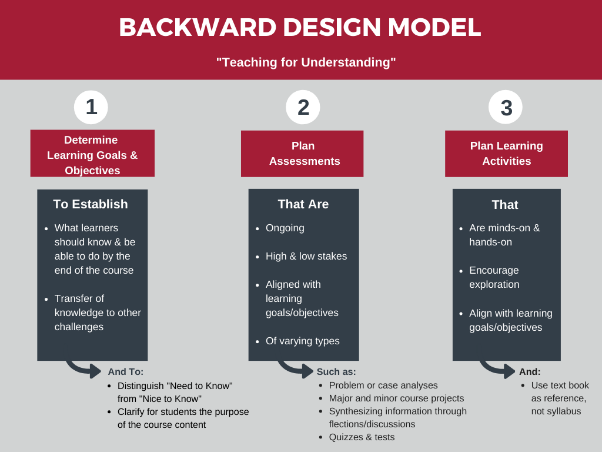
Also known as Understanding by Design, Backward Design starts with desired learning outcomes. Instructors define what students should understand and be able to do, then design assessments and finally create instructional activities (Wiggins & McTighe, 2005). This approach ensures that instructional decisions align with specific goals.
Backward Design Process (License CC 4.0 BY NC SA, Peter Mazohl, 2021). Retrieved from https://www.fade-in.eu/web/es/backward-design/
Course Design: Instructors start by defining clear learning outcomes (Wiggins & McTighe, 2005). These outcomes guide the design of course materials and activities. For example, if the outcome is understanding historical context, instructors can provide varied resources (text, images, videos) to cater to different learning preferences
Backward Design Course Design Example
Creative Writing
Marketing
Identify Learning Outcomes
Define the learning outcomes for the course. For example, by the end of the course, students should be able to develop characters, plot a story, and use descriptive language effectively.
Define the learning outcomes for the course. For example, by the end of the course, students should understand key marketing concepts, be able to develop a marketing plan, and apply marketing strategies in real-world scenarios.
Determine Assessments
Design assessments that align with these outcomes. This could include writing assignments where students must create a short story that demonstrates their ability to develop characters and plot a story. It could also include peer review activities where students provide feedback on the use of descriptive language in each other’s work.
Design assessments that align with these outcomes. This could include a project where students must develop a marketing plan for a hypothetical product or service. It could also include case studies where students must apply marketing strategies to solve real-world problems.
Plan Learning Experiences and Instruction
Plan instructional activities that will help students achieve the learning outcomes. This could include readings on character and plot development, writing exercises to practice using descriptive language, and workshops for peer review.
Plan instructional activities that will help students achieve the learning outcomes. This could include lectures on key marketing concepts, group activities to practice developing marketing plans, and case study discussions to apply marketing strategies.
Assessment Design: Backward Design encourages instructors to create assessments directly aligned with outcomes. For instance, if an outcome involves analyzing data, the assessment might include interactive data visualization tools. By considering UDL, instructors ensure that assessments allow for diverse modes of expression (e.g., written reports, multimedia presentations)
Backward Design Assessment Design Example
Plumbing
Horticulture
Identify Learning Outcomes
Define the learning outcome for the assessment. For example, by the end of this assessment, students should be able to demonstrate their ability to correctly install a pipe system.
Define the learning outcome for the assessment. For example, by the end of this assessment, students should be able to design a garden that includes a variety of plants suitable for a specific climate.
Determine Assessments
Design the assessment that aligns with this outcome. This could be a practical task where students must install a pipe system in a simulated environment.
Design the assessment that aligns with this outcome. This could be a project where students must design a garden for a specific climate, select appropriate plants, and create a maintenance plan.
Plan Learning Experiences and Instruction
Provide instructions and criteria for the task, including safety guidelines, steps for installation, and a checklist for evaluating the installed pipe system.
Provide instructions and criteria for the project, including guidelines for selecting plants, considerations for designing the garden, and a rubric for evaluating the garden design and maintenance plan.
“Backward Design Model” Muhlenberg College (n.d.). Retrieved from https://campdesign.online/backwarddesign.html
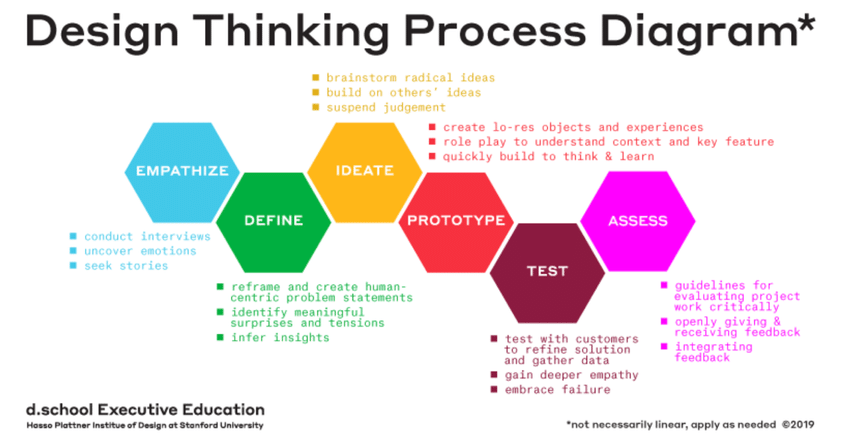
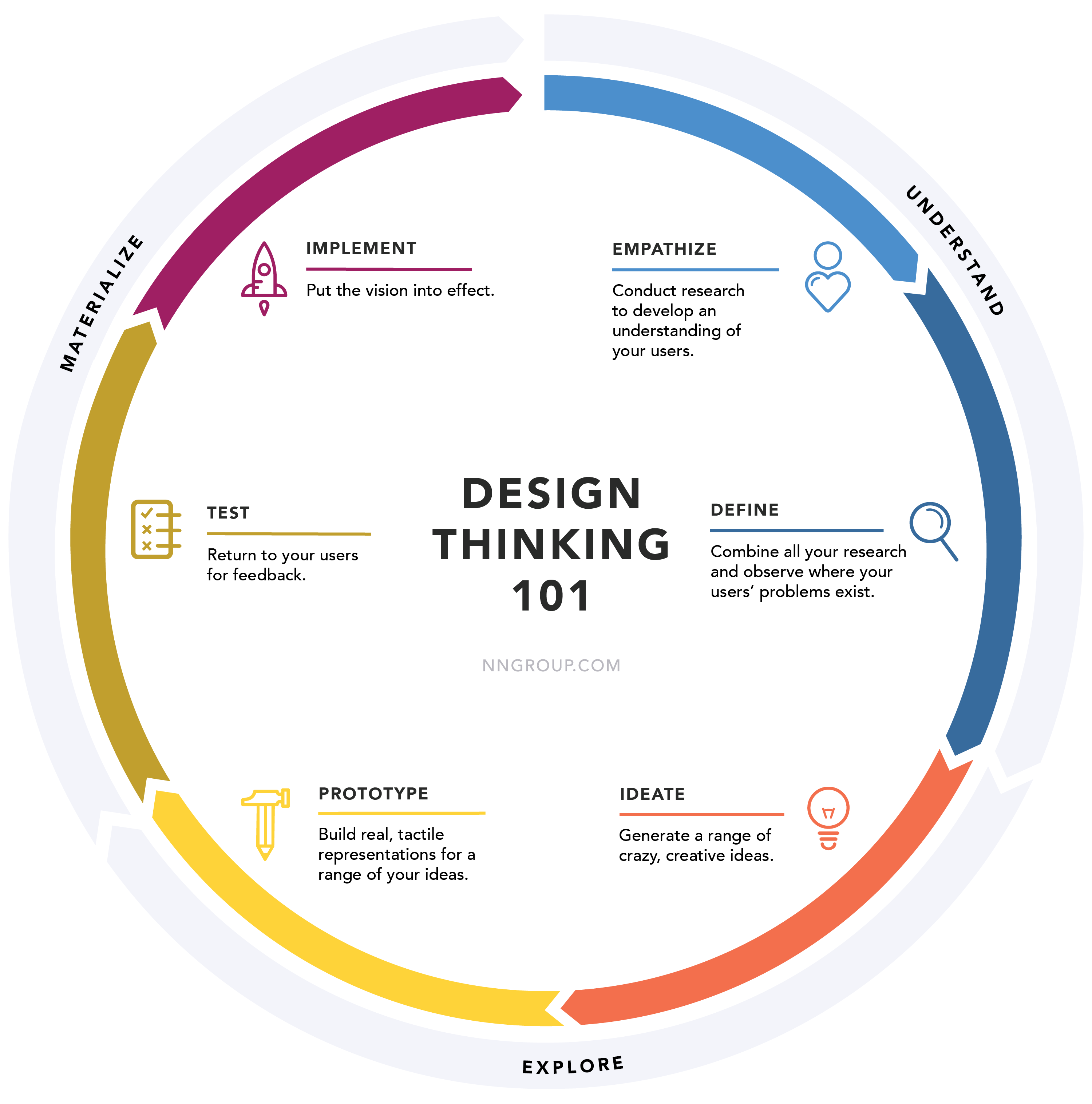
Design Thinking emphasizes creativity, empathy, and iterative problem-solving (Brown, 2008). It involves stages like empathizing (understanding user needs), defining (framing the problem), ideating (generating ideas), prototyping, and testing. This model resonates with UDL’s principle of understanding learner variability. By empathizing with diverse student perspectives, instructors can create more inclusive learning experiences.
“Design Thinking Process Diagram*” by Mar Pulido (2021). Retrieved from https://www.researchgate.net/figure/Five-steps-design-thinking-model-proposed-by-the-Hasso-Plattner-Institute-of-Design-at_fig2_348407540
Course Design: Design Thinking encourages empathy with learners (Brown, 2008). Instructors can engage students in co-designing aspects of the course. For example, students might provide input on content formats or suggest ways to enhance relevance. This participatory approach aligns with UDL’s principle of involving learners in decision-making
Design Thinking Model Course Design Examples
Business Example
Empathize
Conduct surveys or interviews with students to understand their interests, career goals, and learning preferences.
Define
Identify the key learning outcomes for the course, such as understanding business principles, developing strategic thinking skills, and applying business concepts in real-world scenarios.
Ideate
Generate ideas for course content and activities that align with the learning outcomes and student interests. For example, they might plan case studies related to students’ career goals or interactive activities that cater to different learning styles.
Prototype
Design a detailed course syllabus, including a schedule of topics, readings, activities, and assessments. They also create a few sample learning materials, such as lecture slides or case study guides.
Test
Share the course syllabus and sample materials with a few students and/or colleagues for feedback.
Assess
After implementing the course, collect feedback from students about their learning experience, analyzes student performance data, and reflects on what worked well and what could be improved in the next iteration of the course.
Computer Science Example
Empathize
Conduct surveys or interviews with students to understand their prior knowledge of cybersecurity, their interest in different cybersecurity topics (like network security, cryptography, or ethical hacking), and their career aspirations in the field.
Define
Identify the key learning outcomes for the course, such as understanding key cybersecurity concepts, developing skills to protect and defend computer systems, and applying these skills to real-world cybersecurity challenges.
Ideate
Generate ideas for course content and activities that align with the learning outcomes and student interests. For example, they might plan hands-on labs where students can practice defending a system against different types of cyber attacks.
Prototype
Design a detailed course syllabus, including a schedule of topics, readings, lab activities, and assessments. They also create a few sample learning materials, such as lecture slides on different cybersecurity topics or guides for the hands-on labs.
Test
Share the course syllabus and sample materials with a few students and/or colleagues for feedback.
Assess
After implementing the course, collect feedback from students about their learning experience, analyzes student performance data, and reflects on what worked well and what could be improved in the next iteration of the course.
Assessment Design: Instructors can apply Design Thinking to assessment creation. By involving students in defining assessment criteria or allowing them to choose from different assessment options, instructors promote relevance and engagement. For instance, students might propose alternative ways to demonstrate mastery (e.g., creating a podcast instead of a traditional essay)
Design Thinking Model Assessment Design Example
Business Example
Empathize
Conduct surveys or interviews with students to understand their interests, career goals, and learning preferences.
Define
Identify the key learning outcomes for the course, such as understanding business principles, developing strategic thinking skills, and applying business concepts in real-world scenarios.
Ideate
Generate ideas for course content and activities that align with the learning outcomes and student interests. For example, they might plan case studies related to students’ career goals or interactive activities that cater to different learning styles.
Prototype
Design a detailed course syllabus, including a schedule of topics, readings, activities, and assessments. They also create a few sample learning materials, such as lecture slides or case study guides.
Test
Share the course syllabus and sample materials with a few students and/or colleagues for feedback.
Assess
After implementing the course, collect feedback from students about their learning experience, analyzes student performance data, and reflects on what worked well and what could be improved in the next iteration of the course.
Computer Science Example
Empathize
Conduct surveys or interviews with students to understand their prior knowledge of cybersecurity, their interest in different cybersecurity topics (like network security, cryptography, or ethical hacking), and their career aspirations in the field.
Define
Identify the key learning outcomes for the course, such as understanding key cybersecurity concepts, developing skills to protect and defend computer systems, and applying these skills to real-world cybersecurity challenges.
Ideate
Generate ideas for course content and activities that align with the learning outcomes and student interests. For example, they might plan hands-on labs where students can practice defending a system against different types of cyber attacks.
Prototype
Design a detailed course syllabus, including a schedule of topics, readings, lab activities, and assessments. They also create a few sample learning materials, such as lecture slides on different cybersecurity topics or guides for the hands-on labs.
Test
Share the course syllabus and sample materials with a few students and/or colleagues for feedback.
Assess
After implementing the course, collect feedback from students about their learning experience, analyzes student performance data, and reflects on what worked well and what could be improved in the next iteration of the course.
Design Thinking Model Assessment Design Example
Education
Human Resources
Empathize
Understand that students need to demonstrate their ability to design effective lesson plans.
Understand that students need to demonstrate their ability to design effective employee training programs.
Define
Identify the learning outcome for the assessment. For example, by the end of this assessment, students should be able to create a lesson plan that aligns with specific learning objectives and caters to diverse learners.
Identify the learning outcome for the assessment. For example, by the end of this assessment, students should be able to create a training program that addresses a specific skill gap in a hypothetical organization.
Ideate
Generate ideas for the assessment. This could be a project where students must create a lesson plan for a specific topic.
Generate ideas for the assessment. This could be a project where students must create a detailed training program.
Prototype
Design the assignment prompt, which includes the requirements for the lesson plan, the grading rubric, and examples of effective lesson plans.
Design the assignment prompt, which includes the requirements for the training program, the grading rubric, and examples of effective training programs.
Test
Share the assignment prompt with a few students and/or colleagues for feedback.
Share the assignment prompt with a few students and/or colleagues for feedback.
Assess
After implementing the assignment, collect the lesson plans, grades them based on the rubric, collects feedback from students about the assignment, and reflects on what could be improved in the next iteration.
After implementing the assignment, collect the training programs, grades them based on the rubric, collects feedback from students about the assignment, and reflects on what could be improved in the next iteration.
“Design Thinking 101” by Sarah Gibbons (2016). Retrieved from https://www.nngroup.com/articles/design-thinking/
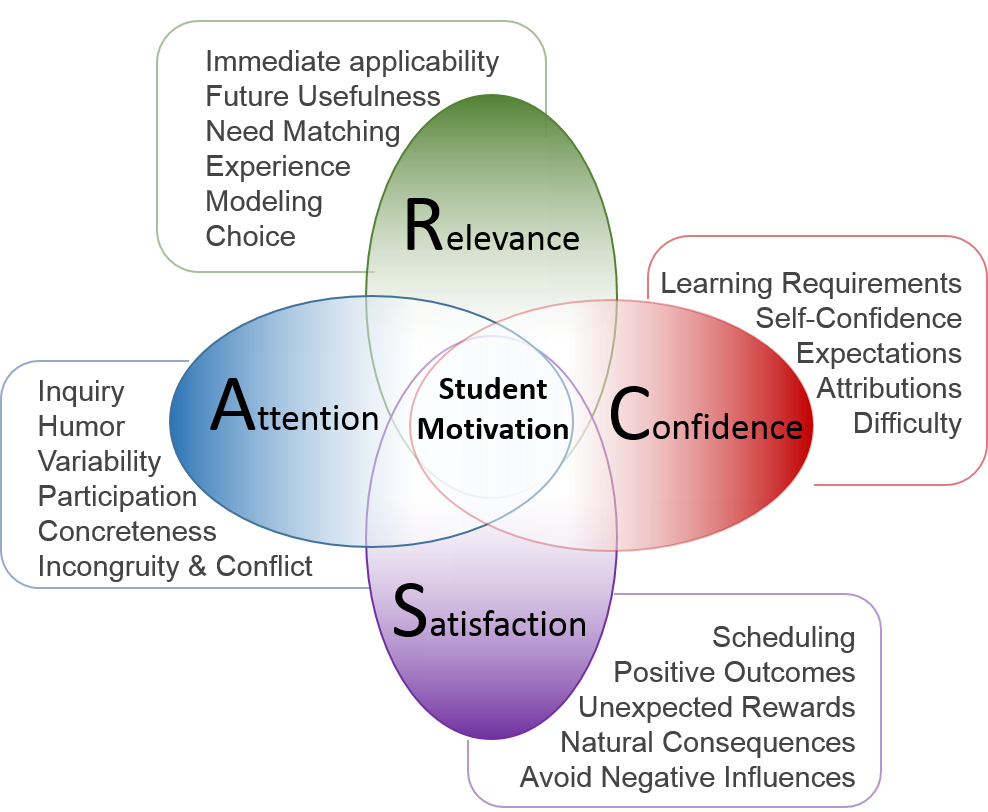
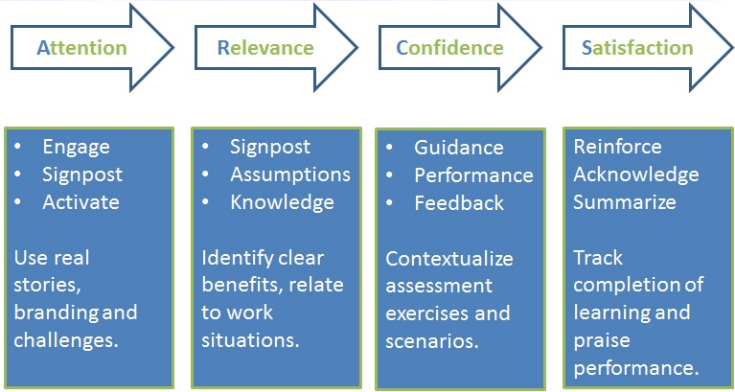
ARCS focuses on engaging learners effectively by addressing attention (capturing interest), relevance (connecting to learners’ goals), confidence (building self-efficacy), and satisfaction (Keller, 1987). Providing varied resources caters to diverse attention needs and fosters a positive learning experience.
“Model Of Motivation: ARCS Instructional Design” by Serhat Kurt (2021). Retrieved from https://educationlibrary.org/model-of-motivation-arcs-instructional-design/
Course Design: Instructors can enhance attention by using varied materials (e.g., videos, interactive simulations) to capture interest (Keller, 1987). Relevance is crucial—connecting content to real-world contexts or learners’ goals. Building learner confidence involves scaffolding (e.g., providing clear instructions). Finally, ensuring satisfaction means creating accessible, positive learning experiences
ARCS Course Design Example
Accounting
Psychology
Attention
Use real-world case studies of companies to illustrate accounting principles and practices, capturing students’ interest.
Use engaging materials such as videos, interactive simulations, or guest speakers (like practicing psychologists or researchers) to capture students’ interest.
Relevance
Connect the course content to the students’ future careers as accountants, emphasizing the practical application of the skills and knowledge they are gaining.
Relate psychological theories and concepts to everyday life and students’ experiences, making the course content relevant to the students.
Confidence
Provide clear instructions and guidelines for assignments and exams, and offer practice problems with solutions, helping students build confidence in their accounting abilities.
Scaffold learning by breaking down complex concepts into manageable parts, providing clear instructions for assignments, and offering opportunities for practice and feedback.
Satisfaction
Provide timely and constructive feedback on assignments and exams, and recognize students’ progress and achievements, ensuring students feel satisfied with their learning experience.
Create a positive learning environment where students feel comfortable asking questions and sharing ideas, and where their progress and achievements are recognized.
Capture students’ interest by assigning a final project where students have the freedom to create their own 3D model of an object or scene of their choice.
Capture students’ attention by designing a lab experiment where students get to synthesize a common compound or carry out a popular reaction (like the iodine clock reaction).
Relevance
Make the assessment relevant by explaining how this project mirrors real-world tasks that 3D modelers would undertake in their careers.
Highlight the relevance of the assessment by explaining how the skills gained from conducting the experiment are essential for many real-world applications in fields like pharmaceuticals, environmental science, and food chemistry.
Confidence
Build students’ confidence by providing clear guidelines for the project, offering resources and tutorials for using the 3D modeling software, and giving students the opportunity to ask questions and get feedback during the project development process.
Build students’ confidence by providing a detailed procedure for the experiment, conducting a demonstration if necessary, and being available for questions and guidance during the lab session.
Satisfaction
Ensure students’ satisfaction by providing constructive feedback on their final projects, recognizing the effort and creativity put into each project, and allowing students to share their work with the class if they wish.
Ensure students’ satisfaction by providing timely and constructive feedback on their lab reports, recognizing their efforts in conducting the experiment and interpreting the results, and discussing the real-world implications of their findings.
“Keller’s ARCS Model” by Maci Devaney (2016). Retrieved from https://mrsdevaneyblog.weebly.com/blog/kellers-arcs-model
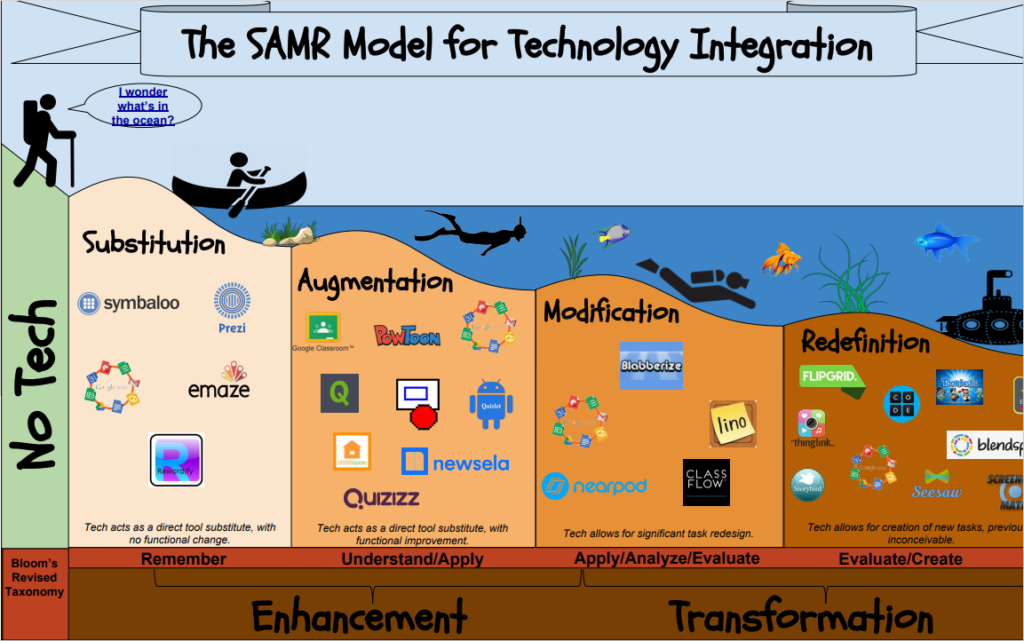
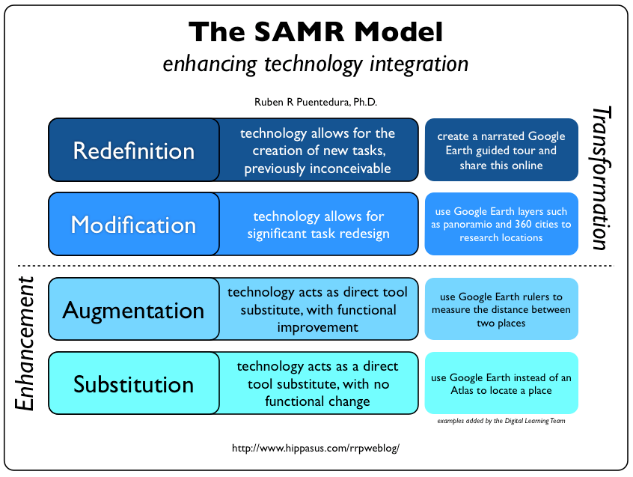
SAMR evaluates technology’s impact on learning tasks, progressing from simple substitution (using technology as a direct replacement) to transformative redefinition (using technology to create new learning experiences) (Puentedura, 2006). It encourages instructors to rethink how technology enhances learning. Aligning with UDL, instructors can use technology to provide varied options for engagement, representation, and expression.
“The SAMR Model for Technology Integration” by Mark Branger (n.d.). Retrieved from https://t2i2.weebly.com/samr-model.html
Course Design: SAMR encourages instructors to rethink technology use (Puentedura, 2006). Instructors can move beyond substitution (e.g., replacing print readings with digital versions) to redefinition. For instance, they might create collaborative online spaces where students engage in real-world problem-solving. By leveraging technology, instructors provide flexible pathways aligned with UDL
SAMR Course Design Example
Automotive Design
Automotive Repair
Substitution
Replace traditional textbooks with digital versions or online resources for studying fashion history and design techniques.
Replace printed repair manuals with digital versions or online databases that provide up-to-date information about different vehicle models.
Augmentation
Using interactive digital tools to demonstrate different design techniques, such as drawing tablets or the lightboard studio.
Use augmented reality (AR) technology to enhance traditional demonstrations, allowing students to see the inner workings of vehicle parts in 3D.
Modification
Modify the learning experience by integrating collaborative online platforms where students can share their designs and receive feedback from peers.
Modify the learning experience by using interactive online simulations that allow students to practice repair procedures in a virtual environment.
Redefinition
Have students use digital design software to create their own virtual fashion ePortfolios (e.g., PebblePad), which can be shared online for a wider audience.
Integrate real-world problem-solving tasks, such as diagnosing and repairing issues in a virtual car repair scenario.
Assessment Design: SAMR prompts instructors to transform assessment practices. Instead of traditional paper-based exams, instructors might use adaptive quizzes or peer-reviewed multimedia projects. By redefining assessments, instructors accommodate diverse learner preferences and abilities
SAMR Assessment Design Example
Music Composition
Employment Studies
Substitution
Instead of a live performance, students can record their performance using a simple recording device or software.
Instead of conducting a face-to-face role-play of a job interview, students can use video conferencing tools (such as Teams or BBB) to simulate a remote job interview.
Augmentation
Students can use music editing software to enhance the quality of their recording, adjusting aspects like volume and balance.
Students can use features of the video conferencing tool, such as screen sharing, to present their portfolio or work samples during the role-play.
Modification
Students can use advanced features of the software to add accompaniment or harmonies to their performance, transforming it into a more complex piece.
Students can record their role-play and use video editing tools to highlight key moments or responses in the interview.
Redefinition
Students can share their recordings in an ePortfolio or through Moodle, allowing for peer feedback and discussion. This not only assesses their performance skills but also their ability to give and receive constructive feedback.
The recorded interviews can be shared through an ePortfolio or Moodle, and students can provide peer feedback, assessing not only their interview skills but also their ability to critique and learn from others.
“The SAMR Model” by Ruben R. Puentedura (2016). Retrieved from https://www.mrskarpiuk.com/the-samr-model-to-enhance-technology-integration/
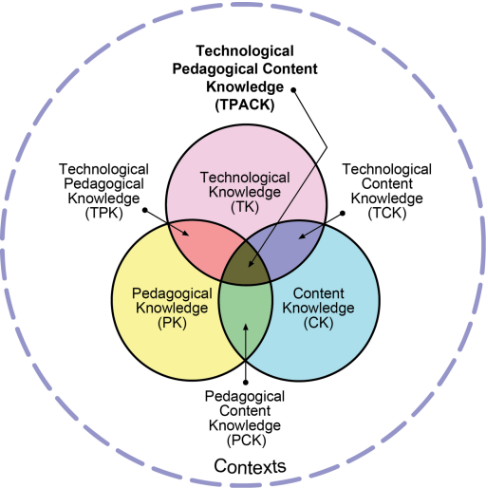
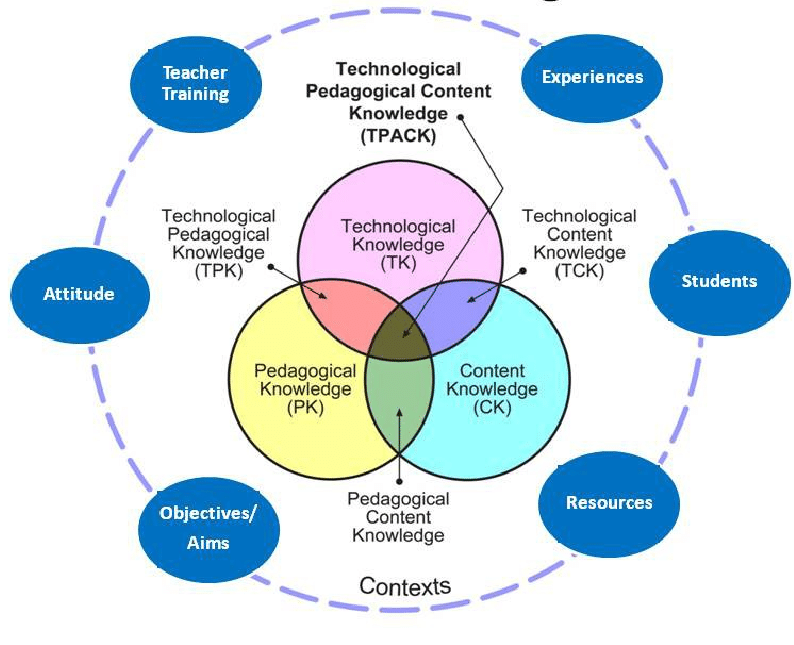
TPACK integrates content knowledge, pedagogical knowledge, and technological knowledge (Mishra & Koehler, 2006). It recognizes that effective teaching involves the interplay of these domains. By combining content expertise, pedagogical strategies, and tech tools, instructors can provide flexible pathways for content delivery, assessment, and student expression.
Course Design: TPACK encourages instructors to integrate technology thoughtfully (Mishra & Koehler, 2006). Instructors can use technology to provide flexible content delivery (e.g., recorded lectures, interactive modules). Pedagogical strategies (e.g., active learning techniques) enhance engagement. By combining content expertise, pedagogy, and tech tools, instructors create UDL-aligned courses
TPACK Course Design Example
Anthropology
Public Relations
Technological Knowledge
Record lectures on different anthropological theories, interactive modules on human evolution, and virtual tours of archaeological sites.
Record lectures on PR strategies, interactive modules on crisis management, and webinars with PR professionals.
Pedagogical Knowledge
Active learning techniques could include group discussions, case studies, and role-playing exercises to understand different cultures and societies.
Active learning techniques could include role-playing exercises for crisis management, group projects for developing PR campaigns, and class discussions on case studies.
Content Knowledge
The course could cover topics such as human evolution, archeological excavation, and cultures and societies.
The course could cover topics such as crisis management, media relations, and corporate communication.
Assessment Design: TPACK informs assessment choices. Instructors consider content-specific assessment methods (e.g., lab experiments, case studies) and leverage technology (e.g., online quizzes, peer feedback platforms). By balancing these domains, instructors ensure assessments accommodate diverse learners
TPACK Assessment Design Example
Entrepreneurial Leadership
Sustainable Agriculture
Technological Knowledge
Use of technology such as online peer feedback platforms for students to evaluate each other’s leadership strategies and business plans.
Use of technology such as virtual reality or augmented reality tools for students to design and present a sustainable farm model.
Pedagogical Knowledge
Could use a scenario where students are required to develop and present a business plan for a startup, integrating leadership strategies learned in the course.
Could use problem-based learning (PBL) where students are required to design a sustainable farm model, integrating sustainable agriculture practices learned in the course.
Content Knowledge
Demonstrate an understanding of entrepreneurial leadership concepts such as vision, decision-making, team building, and risk management.
Demonstrate an understanding of sustainable agriculture concepts such as crop rotation, soil conservation, water management, and organic farming.
“TPACK and context influences” (2016) Nyarai Tunjera, Janet Condy, Agnes Chigona, & Chantyclaire A. Tiba. Retrieved from https://www.researchgate.net/figure/TPACK-and-context-influences_fig1_301613042
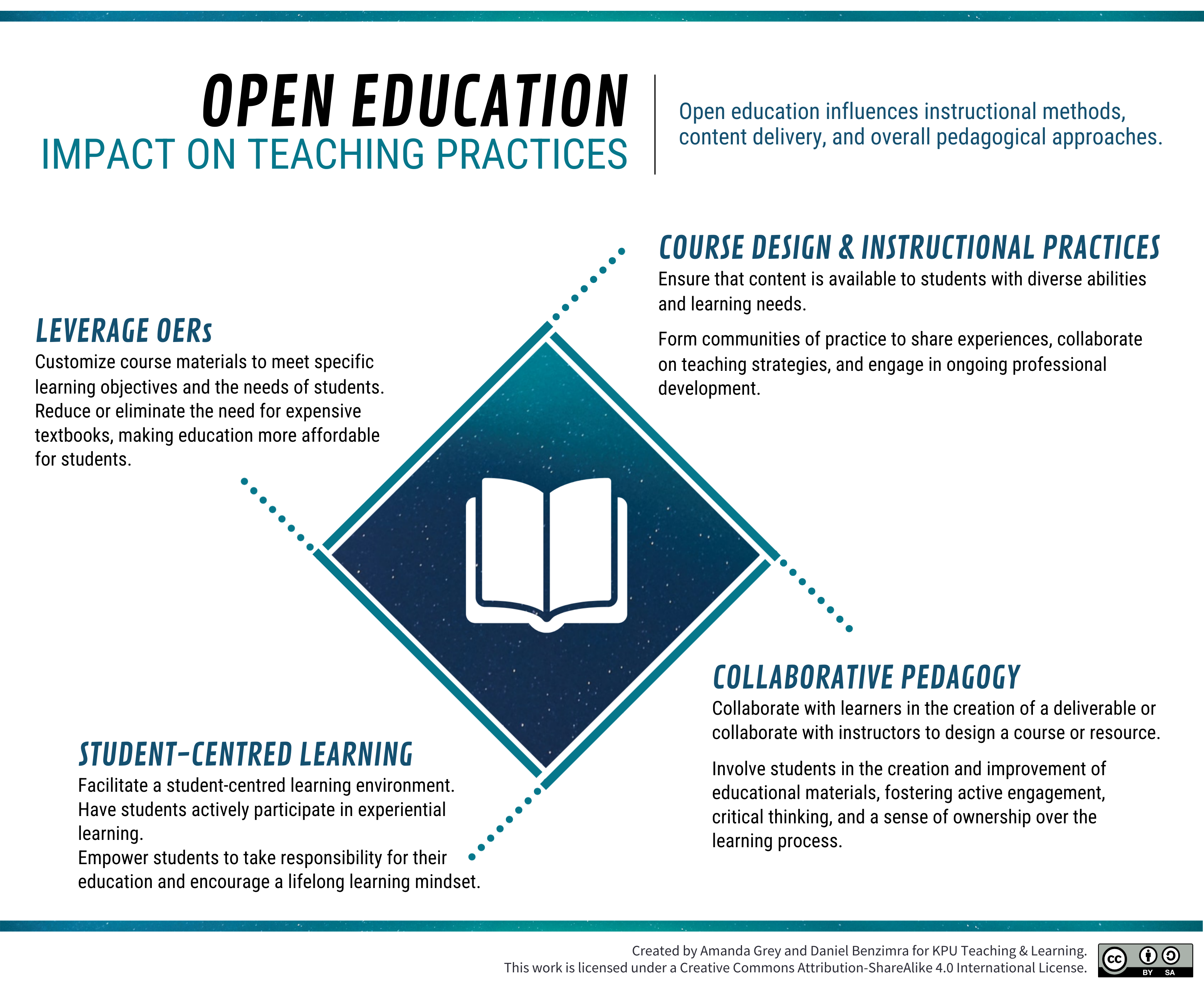
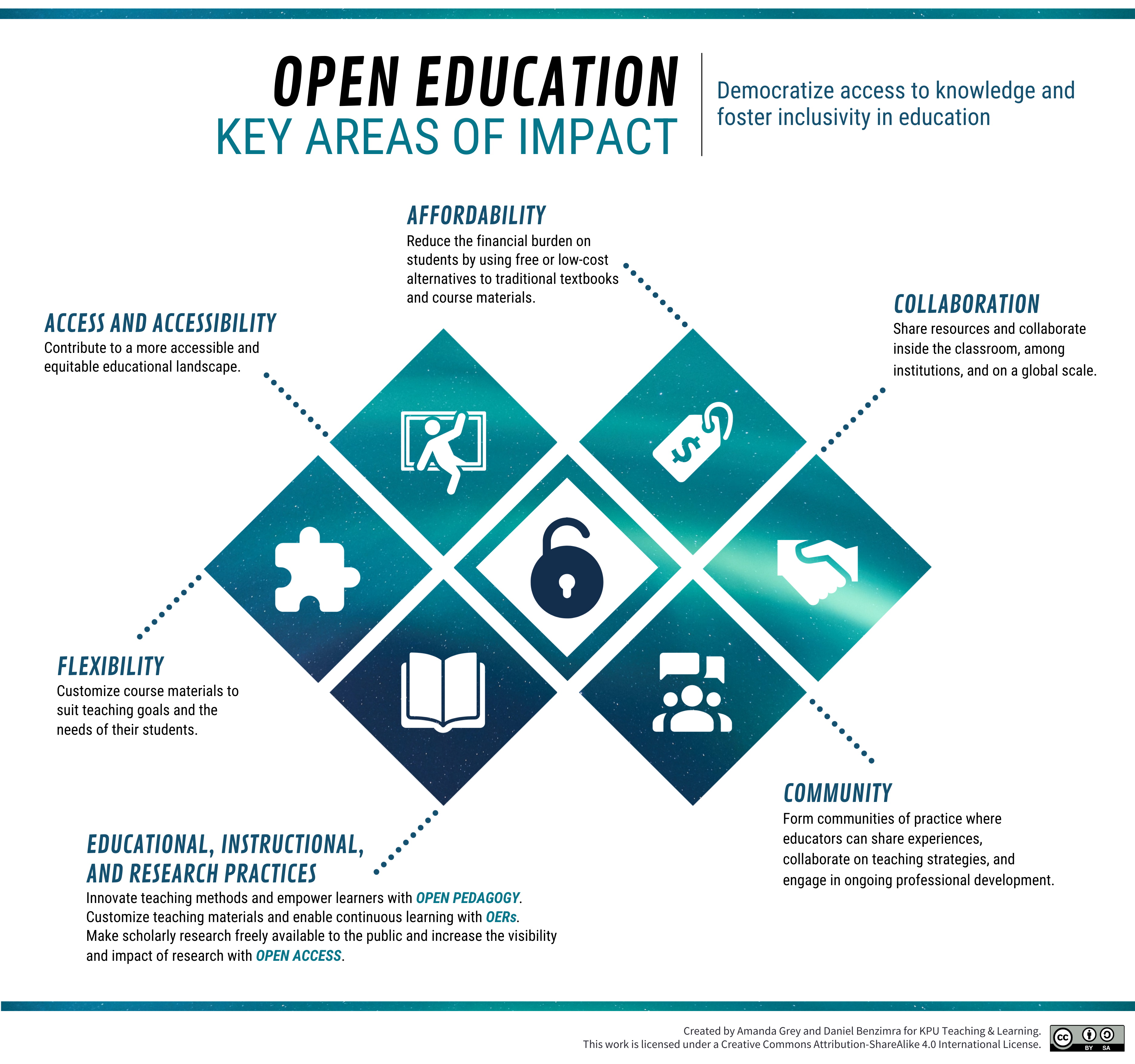
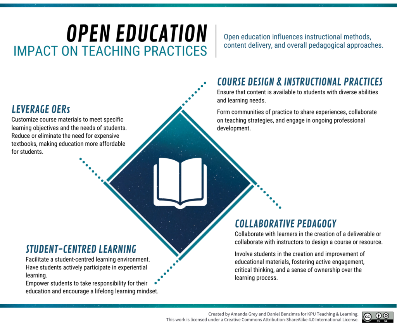
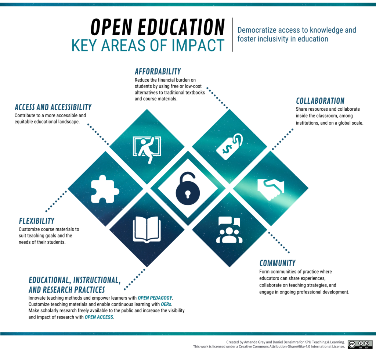
Open Education refers to a teaching approach as well as a set of practices that promote access to education by removing barriers and making learning materials freely available to everyone (Wiley & Hilton, 2018). It is grounded in the belief that education is a fundamental human right, globally recognized as a foundation for peace, human dignity, social inclusion, and environmental sustainability (UNESCO, 2016). However, various barriers limit access to and engagement with education for many individuals and groups. These include physical circumstances, geographic remoteness, financial constraints, technological barriers, and/or cultural or social norms (Brown & Czerniewicz, 2010; Lane, 2009). Open education seeks to eliminate these barriers where possible, with the aim of improving educational access, effectiveness, and equality (Cronin, 2019).
For a video overview of Open Education, please click:
The idea of “open-ness” can be applied to various teaching practices, grouped under the umbrella term of Open Practices. The most widely used open practice is the use of Open Educational Resources (OERs): teaching, learning, and research resources that are free of cost and access barriers, and which also carry legal permission for open use (Hewlett Foundation, 2013). These will be discussed in more detail in a further section (Resources Acquisition). Another open practice is Open Pedagogy, where teachers build opportunities for learners to access education, resources, and scholarship; to collaborate with others; to create and co-create knowledge openly; and to integrate learning from outside the classroom (Cronin, 2019). These practices overlap with many other education frameworks, such as active learning and Universal Design for Learning (UDL)and more.
Check out our blog for an idea of how to apply “open-ness” to course design:
Open Education aligns with the principles of UDL by providing multiple means of representation, action and expression, and engagement. For example, OERs can be adapted to meet diverse learning needs, offering various formats (text, audio, video, interactive simulations) that cater to different learning preferences (Rose & Meyer, 2002). This flexibility allows for customization of instruction, supporting the UDL principle of multiple means of representation. Furthermore, open education fosters multiple means of action and expression by allowing learners to interact with and adapt the materials to demonstrate their knowledge in ways that suit their strengths, such as through multimedia projects or written reports (Mishra, 2017). By aligning with these UDL principles, open education makes learning more accessible and personalized, thereby enhancing the educational experience for all students (Wiley, 2014).
Open Pedagogy builds on the principles of Open Education to involve students in the creation of learning materials. It emphasizes learner agency, collaboration, and the development of “renewable assignments” which add value to the world beyond the classroom (DeRosa & Jhangiani, 2017).
Open Pedagogy supports the UDL framework by fostering student engagement and providing multiple means of action and expression. By involving students in the creation and adaptation of OERs, Open Pedagogy provides opportunities for authentic, meaningful learning experiences that cater to individual interests and abilities (Rose & Meyer, 2002). This participatory process not only enhances motivation and engagement but also allows learners to express their understanding in diverse ways.
Renewable Assignments in Open Pedagogy are designed to be reused and built upon over time, contributing to a larger body of knowledge. They align with UDL principles by fostering student engagement, providing diverse ways of representing knowledge, and allowing students to demonstrate their understanding in various ways. This approach makes learning more flexible, inclusive, and values student contribution and diversity.
Here is an H5P example to help explain Renewable Assignments. Click the plus signs on the image below to see how the characteristics could be applied to assignment design, turning it into a Renewable Assignment.
Renewable Assignments in Open Pedagogy, designed for reuse and contribution to broader knowledge, align with UDL principles. They enhance engagement by adding relevance to student work, offer diverse representation of knowledge through continuous revision, and allow for varied expression as students can choose their approach to the assignment. Thus, they support a flexible, inclusive learning experience that values student contribution and diversity.
For further context and application of Open Pedagogy and renewable assignments, please visit our blog:
The choice of course modality can significantly impact the learning experience. Whether the course is assigned as in-person, online, or blended modalities, the principles of Universal Design for Learning (UDL) can offer valuable guidance. This section aims to provide instructors with practical insights and considerations on how UDL can be effectively integrated into their chosen course modality.
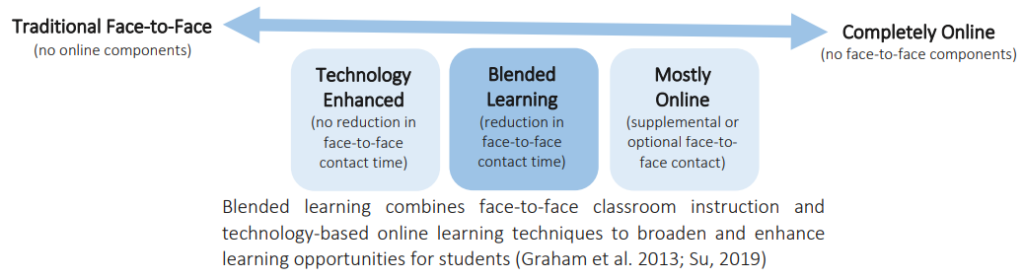
“Defining Blended Learning” Jessica Gemella (2023) CC-BY-NC. Retrieved from https://wordpress.viu.ca/lifeisanapprenticeship/files/2023/05/Communicate-Course-Modality-and-TT-DRAFT.pdf
The following sections will explore how applying UDL can enhance accessibility, engagement, and learning outcomes within a course. This exploration is grounded in the belief that every learning environment, regardless of its modality, can be designed to meet the diverse needs of all students.
In-person instruction, sometimes referred to as Face-to-Face (F2F), inherently provides a physical learning environment conducive to fostering a sense of community and facilitating direct interpersonal communication. This environment significantly enhances learning experiences through group discussions, debates, and collaborative activities. For instance, when students engage in a debate about a historical event, the immediacy of in-person interaction allows them to pick up on nonverbal cues, ask follow-up questions, and clarify misconceptions in real-time. These dynamics are exclusive to in-person instruction and cannot be replicated in the same way within online or hybrid modalities (Vygotsky, 1978; Bolliger & Martin, 2018).
In-person instruction does however present unique challenges regarding the implementation of Universal Design for Learning (UDL) principles. One notable limitation is the often synchronous and time-bound nature of content delivery in traditional in-person settings. For example, when a teacher delivers a lecture, the allotted time may not accommodate diverse learning paces. Students who require more time to grasp concepts may find themselves lost, while faster learners may feel unchallenged. In contrast, online or hybrid modalities facilitate asynchronous access to content, allowing learners to engage at their own pace, review materials as needed, and revisit complex topics (Rose & Meyer, 2002).
Though in-person instruction enables immediate feedback from instructors—which can be valuable during discussions or when responding to student questions—this format may limit opportunities for deeper reflection, which is essential for meaningful learning. For instance, if a student receives verbal feedback during class, they may not have the time to process it fully before needing to move on to the next topic. On the other hand, online learning environments often provide discussion forums and recorded lectures, allowing students the flexibility to reflect on feedback at their own pace and integrate it into their learning processes (Meyer et al., 2014).
Furthermore, accessibility in in-person classrooms can present physical barriers that hinder participation for some students. For example, a student with mobility challenges may struggle to navigate a traditional classroom or may not have access to seating arrangements conducive to their needs. In contrast, online learning environments can be designed with accessibility in mind, utilizing digital resources and adaptive technologies that meet the diverse needs of all learners. For instance, materials can be provided in multiple formats (e.g., text, audio, and video), ensuring that all students can engage meaningfully with the content (Higgins et al., 2005).
Here are some specific strategies to help address aspects of in-person course modality that may not support students as well under UDL compared to other modalities:
Active Learning Spaces: Traditional in-person classrooms often have fixed seating, which can limit collaboration and engagement. Consider rearranging the classroom into an active learning space that allows for flexible grouping and movement
Real-Time Captioning or Transcripts: In in-person settings, auditory information is often not accessible to all. Providing real-time captioning for lectures or ensuring transcripts are available can help
Visual Aids: Use visual aids during lectures to cater to visual learners. This could include diagrams, charts, or infographics
Breakout Sessions: Large in-person classes can be intimidating for some students. Breakout sessions can provide a more comfortable setting for students to participate
Hands-On Activities: In-person instruction allows for hands-on activities that can cater to kinesthetic learners. Lab experiments, physical models, or manipulatives can be used to supplement theoretical concepts
Immediate Feedback: Leverage the advantage of immediate feedback in in-person settings. This could be through in-class quizzes, polls, or Q&A sessions
Inclusive Language: Use inclusive language in the classroom to create a welcoming learning environment for all students
Physical Accessibility: Ensure the physical classroom is accessible to everyone. This includes considering seating arrangements, classroom entry/exit, and the layout of learning stations
While in-person instruction offers unique benefits, such as community building and immediate interaction, it also poses challenges regarding UDL implementation. Instructors must be proactive in addressing these challenges by creating inclusive, flexible, and responsive in-person learning environments. This can be achieved by integrating varied teaching strategies, such as cooperative learning, differentiated instruction, and utilizing technology to enhance accessibility and engagement.
Online learning, both synchronous and asynchronous, inherently provides a digital learning environment that can foster a sense of community and facilitate direct interpersonal communication (Smith & Tyler, 2022). This environment significantly enhances learning experiences through group discussions, debates, and collaborative activities conducted via online platforms (O’Neill & McMahon, 2023). For instance, when students engage in a debate about a historical event on a discussion forum, the asynchronous nature of online interaction allows them to take time to formulate responses, conduct additional research, and articulate their thoughts more clearly (O’Neill & McMahon, 2023).
However, online instruction presents unique challenges regarding the implementation of UDL. One notable limitation is the potential lack of immediate, real-time feedback in asynchronous settings (Smith & Tyler, 2022). For example, when a teacher posts a lecture video, immediate clarification of doubts may not be possible. Students who require immediate feedback may find this challenging.
Though online instruction enables flexibility—which can be valuable for accommodating diverse schedules and learning paces—this format may limit opportunities for spontaneous, real-time interaction, which is essential for meaningful learning (Smith & Tyler, 2022). For instance, a student may not have the opportunity to ask immediate follow-up question based on feedback on an assignment via email.
Furthermore, accessibility in online classrooms can present technological barriers that hinder participation for some students (Shankar & Murray, 2024). For example, a student with limited internet access may struggle to participate in synchronous online sessions or may not have access to high-bandwidth activities such as video streaming (Shankar & Murray, 2024).
For further context and background, please see the following resources:
Here are some specific strategies to help address aspects of online course modality that may not support students as well under UDL compared to other modalities:
Interactive Digital Spaces: Traditional online classrooms often lack interactivity, which can limit engagement. Consider integrating interactive elements such as polls, quizzes, and discussion forums
Captioning and Transcripts for Video Content: In online settings, auditory information in videos is often not accessible to all. Providing captioning for video content or ensuring transcripts are available can help
Visual Aids: Use visual aids during lectures to cater to visual learners. This could include diagrams, charts, or infographics
Breakout Sessions: Large online classes can be intimidating for some students. Breakout sessions in video conferences can provide a more comfortable setting for students to participate
Hands-On Activities: Online instruction allows for virtual hands-on activities that can cater to kinesthetic learners. Virtual labs, simulations, or interactive modules can be used to supplement theoretical concepts
Timely Feedback: Leverage the advantage of digital tools to provide timely feedback in online settings. This could be through in-platform quizzes, polls, or Q&A sessions
Inclusive Language: Use inclusive language in the online classroom to create a welcoming learning environment for all students
Technological Accessibility: Ensure the online classroom is accessible to everyone. This includes considering internet bandwidth requirements, device compatibility, and the user-friendliness of learning platforms
While online instruction offers unique benefits, such as flexibility and accessibility, it also poses challenges regarding UDL implementation (Smith & Tyler, 2022). Instructors must be proactive in addressing these challenges by creating inclusive, flexible, and responsive online learning environments (Hock & McMahon, 2026). This can be achieved by integrating varied teaching strategies, such as cooperative learning, differentiated instruction, and utilizing technology to enhance accessibility and engagement (Hock & McMahon, 2026).
Blended learning, a pedagogical approach that integrates traditional face-to-face (F2F) instruction with online learning, offers a balance between the immediacy of F2F interaction and the flexibility of online learning (Tucker, 2020). This approach caters to diverse student needs and preferences, enhancing learning experiences by providing a variety of participation modes. It naturally aligns with Universal Design for Learning (UDL) in several ways. For instance, it inherently provides multiple means of representing information, a core principle of UDL. Content can be delivered through F2F lectures, online readings, videos, and interactive simulations.
The flexibility of blended learning caters to diverse learner needs and preferences. Students can choose to engage with the material in the way that best suits their learning style, whether that’s attending a F2F lecture, participating in an online discussion, or reviewing recorded materials at their own pace. Furthermore, blended learning naturally fosters collaboration by providing both F2F and online platforms for student interaction, aligning with the UDL principle of multiple means of engagement (Schwartz, 2022).
However, implementing UDL principles in a blended learning environment presents unique challenges. One significant challenge is maintaining engagement across both F2F and online components. Students may engage more actively in F2F discussions but be less participative in online forums. Instructors must therefore strive to foster engagement in both settings, such as by integrating online discussions into F2F classes or vice versa. Another challenge is ensuring continuity between F2F and online components. A concept introduced in a F2F lecture should be seamlessly extended in the online component, and vice versa. This requires careful planning and coordination of learning activities across both settings (Tucker, 2020).
For further context and background, please see the following resources:
Here are some specific strategies to help address aspects of blended learning course modality that may not support students as well under UDL compared to other modalities:
Balanced Participation: Encourage students to participate equally in both F2F and online components. This could involve integrating online discussions into F2F classes or setting up equivalent F2F activities for online discussions
Continuity Across Components: Ensure that learning activities in the F2F setting are seamlessly extended in the online component, and vice versa. This could involve using a consistent theme or project across both settings
Accessible Materials: As with Simultaneous Streaming instruction, ensure all course materials are accessible in both settings. This could involve providing captions for video content or ensuring that online materials are compatible with assistive technologies (Tucker, 2020)
While blended learning offers unique benefits, such as a balance between flexibility and immediacy, it also poses challenges regarding UDL implementation. Ensuring all students have equitable access to these resources can be challenging. For instance, not all students may have reliable internet access for online components. Assessing student learning in a blended environment can be complex. Instructors need to design assessments that are valid and reliable across both F2F and online settings. Instructors must be proactive in addressing these challenges by creating inclusive, flexible, and responsive blended learning environments. This can be achieved by integrating varied teaching strategies, such as cooperative learning, differentiated instruction, and utilizing technology to enhance accessibility and engagement (Schwartz, 2022).
UDLing into Practice
Scenario 1
Self-Reflection & Application
Reflect on your experiences and knowledge of Universal Design for Learning (UDL) and different course modalities (in-person, online synchronous, online asynchronous, and blended). Consider a course you have previously taught or one you are planning to teach. Using your understanding of UDL principles and the unique characteristics of each modality, design a plan for integrating UDL in your course. What celebrations and challenges do you foresee, and how will you address them? How will you ensure that all students, regardless of their chosen modality, have equitable access to learning and engagement opportunities? Provide specific examples or strategies from your own practice that you would implement to create an inclusive and supportive learning environment.
Scenario 2
Course Modality Choice
As an experienced university instructor, you have been given the opportunity to decide which modality you will use to teach your new course next semester. The options are in-person, online (both synchronous and asynchronous), and blended. Your decision must take into account the principles of Universal Design for Learning (UDL) to ensure that all students have equitable access to learning, regardless of the modality chosen. Considering the principles of UDL and the unique challenges and benefits of each modality, which modality would you choose for your course? How would you ensure that UDL principles are integrated to support that particular modality? Include specific strategies and resources you would use to cater to diverse learning needs and preferences.
Scenario 3
Course Modality Evaluation
You have been tasked with evaluating a newly proposed course for the upcoming semester. As an experienced instructor and advocate for Universal Design for Learning (UDL), you have concerns about the current lack of UDL principles in the course design. Your goal is to provide constructive suggestions on how to best integrate UDL principles, ensuring that the course is accessible and inclusive for all students, regardless of the chosen modality (in-person, online synchronous, online asynchronous, and blended). By integrating these UDL strategies, you can create a more inclusive and flexible learning environment that supports the diverse needs of all students. Your evaluation and suggestions will play a crucial role in enhancing the accessibility and effectiveness of the proposed course.
Creating inclusive learning experiences requires a thoughtful approach to instructional design, ensuring that activities are adaptable and engaging for all students. This involves embedding variability and flexibility into the design process to cater to diverse learning needs and preferences. The following sections will explore key strategies for including variability in instructional activities, including offering a range of activity types, providing choices in assignments, delivering content flexibly, and designing adaptive learning paths. These strategies aim to create a dynamic and inclusive learning environment that responds to the diverse needs of all students.
In addition to these strategies, the section will also cover the use of educational technology to enhance accessibility and engagement, the importance of a student-centered approach, and the integration of collaborative learning opportunities. By considering these elements, instructors can create instructional activities that not only support diverse learners but also foster a more inclusive and effective educational experience.
When designing instructional activities, it’s essential to consider the diverse needs of all learners. This is where the Universal Design for Learning (UDL) comes into play. When we view instructional activities through the lens of UDL, we see the importance of embedding variability and flexibility in our design.
This variability is not about merely providing options for the sake of choice but about creating meaningful and adaptable activities that offer multiple means of engagement, representation, and expression. It’s about recognizing that each learner is unique and that a one-size-fits-all approach to education is ineffective.
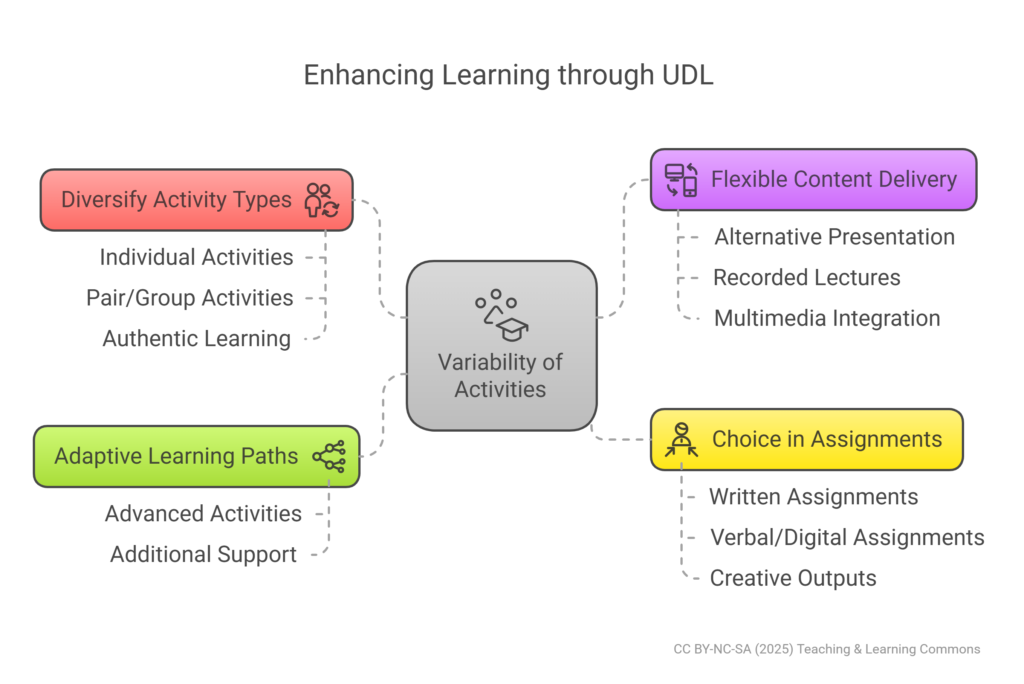
By diversifying activity types, delivering content flexibly, offering a choice in assignments, and designing adaptive learning paths, we can create a learning environment that is responsive to each student’s strengths, preferences, and needs. This approach not only enhances accessibility and inclusivity but also fosters a deeper, more personalized learning experience.
Including a mix of individual, pair, and group activities can cater to different learning preferences and promote engagement. For example, individual activities such as reflective journals allow students to process and internalize new information. On the other hand, pair or group activities, such as collaborative projects or peer-review exercises, can foster communication skills and expose students to diverse perspectives (Rose & Meyer, 2002).
Varying the format of activities – from discussions and debates to hands-on experiments, field trips, or digital simulations – can keep students engaged and cater to different learning styles. To maintain engagement, it’s important to include a variety of activity types that spark interest and motivation (Smith & Throne, 2007b).
Allowing students to select topics that interest them fosters intrinsic motivation. Providing activities with different levels of difficulty ensures that all students can find appropriate challenges. Offering options for both collaborative group work and solo projects caters to student preference and learning style. Integrating gamified elements, such as quizzes and interactive simulations, makes learning more dynamic and enjoyable (Meyer, Rose, & Gordon, 2014). By embedding variability within these aspects, instructors create a learning environment that can adjust to students’ diverse needs and keep them engaged
To accommodate different learning styles and preferences, content can be delivered in multiple ways. For instance, a lecture could be delivered live for those who benefit from real-time interaction. Alternatively, it could be recorded for students who prefer to learn at their own pace or need to revisit the material for better understanding.
Transcribing the lecture into text can assist students who prefer reading or need to reference the material later. Additionally, understanding and engagement can be enhanced by including multimedia elements such as images, audio, and video (Hall, Cohen, Vue, & Ganley, 2015).
To address the principle of multiple means of representation, activities should be designed with varied content delivery methods. This could include using readable and well-organized text for those who prefer reading. For visual learners, diagrams, infographics, charts, and videos could be integrated (Rose & Meyer, 2002).
Podcasts or audio recordings could be provided to support auditory learners. By offering activities that utilize different forms of media, instructors can cater to students’ diverse perceptual strengths and preferences. This approach ensures a comprehensive and inclusive learning experience for all students.
Motivation and engagement can be increased by allowing students to choose from a range of assignments. For instance, if a student excels in written communication, they could choose to write an essay. Alternatively, if they are more comfortable with verbal communication or have strong digital skills, they could create a video presentation. Offering a choice of assignments not only caters to students’ strengths but also allows them to take ownership of their learning. However, it’s important to ensure that all assignment options align with the learning objectives and offer equal opportunities for students to demonstrate their understanding (Rao, Ok, & Bryant, 2014).
In alignment with the principle of multiple means of action and expression, activities should be designed to allow students to demonstrate their understanding in various ways. This could include essays or written reports for students who are strong in written communication. Video or in-person presentations could be used to allow students to express their knowledge verbally.
Creative outputs like art projects, multimedia presentations, or digital storytelling could be encouraged (Rose & Gravel, 2010). Interactive tools like argument mapping software or concept maps could be used to help students organize and express their ideas. This flexibility ensures that students can play to their strengths and choose the method that best suits their communication style. This approach ensures a comprehensive and inclusive learning experience for all students.
Designing activities that adapt to the learner’s progress can provide a personalized learning experience. For example, if a student excels in a particular topic, they could be given more advanced activities to challenge them and deepen their understanding. Conversely, if a student struggles, they could be given additional support or alternative activities to help them grasp the concept. Adaptive learning paths require ongoing assessment and feedback, but they can significantly enhance learning outcomes.
While by no means an exhaustive list, the following are some practical examples of what variability in instructional activities might look like. Online forums can facilitate asynchronous discussions, catering to those who need more time to process their thoughts. Peer review activities can help students engage with each other’s work, offering a variety of perspectives.
By using a flipped classroom model, students can engage with video lectures and readings at their own pace. They can then apply their knowledge through in-class activities, such as problem-solving sessions or debates. Larger projects can be broken down into smaller, scaffolded tasks. This allows students to build their skills incrementally and receive varied types of support and feedback along the way (Smith & Throne, 2007b). This approach ensures a comprehensive and inclusive learning experience for all students.
A student-centered approach prioritizes the needs, preferences, and active participation of learners in the instructional design process. This approach encourages students to be active agents in their own learning journey. For further context and background, please see the following resources:
Consider the following student-centred and UDL-aligned approaches:
Cognitive Load Theory:emphasizes managing learner information and mental effort.
Chunking Information: Break complex information into manageable chunks. For example, while teaching a scientific process, segment each step into smaller lessons (Sweller, Ayres, & Kalyuga, 2011; Rose & Gravel, 2010a)
Scaffolding: Provide supportive structures to guide learners through complex tasks. This might involve step-by-step instructions or using simplified examples before tackling more challenging content (Puntambekar & Hübscher, 2005; Rose & Meyer, 2002)
Dual Coding: Combine visual and verbal information to utilize different cognitive pathways. For example, use diagrams with explanatory text to explain concepts (Mayer & Moreno, 2003; Rose & Gravel, 2010b)
Reflective Practice and Self-Assessment: Encourage reflection and self-assessment to develop metacognitive skills.
Reflective Journals: Use journals for students to document their learning experiences, challenges, and insights (Boud, Keogh, & Walker, 1995; Schön, 1996)
Self-Assessments: Offer self-assessment opportunities with rubrics or checklists to foster independence and self-awareness in learning (Andrade, 2007)
Peer Feedback: Facilitate peer review sessions to enhance critical thinking and collaborative learning (Topping, 1998; Smith & Throne, 2007a)
Integrating Diverse Perspectives and Cultural Sensitivity: Ensure instructional activities reflect cultural diversity and inclusivity.
Culturally Responsive Teaching: Include diverse examples and case studies to enrich the learning experience and ensure all students feel represented (Gay, 2010)
Inclusive Materials: Avoid content that may be offensive or exclusionary to certain groups, fostering a respect-filled learning environment (Burgstahler, 2015; Edyburn, 2010)
Inclusive course materials are essential for implementing UDL. This involves creating or selecting materials that are accessible to all students, regardless of their abilities or disabilities (Burgstahler, 2015). For further information, please see the section on Course Outlines and Course Syllabi as it relates to course materials.
Course example:
Digital materials should be compatible with assistive technologies, such as screen readers and text-to-voice and voice-to-text. Text-based materials should be provided in a format that can be enlarged or converted into audio. Videos should include captions and transcripts. By considering these factors, instructors can ensure that course materials are accessible and inclusive.
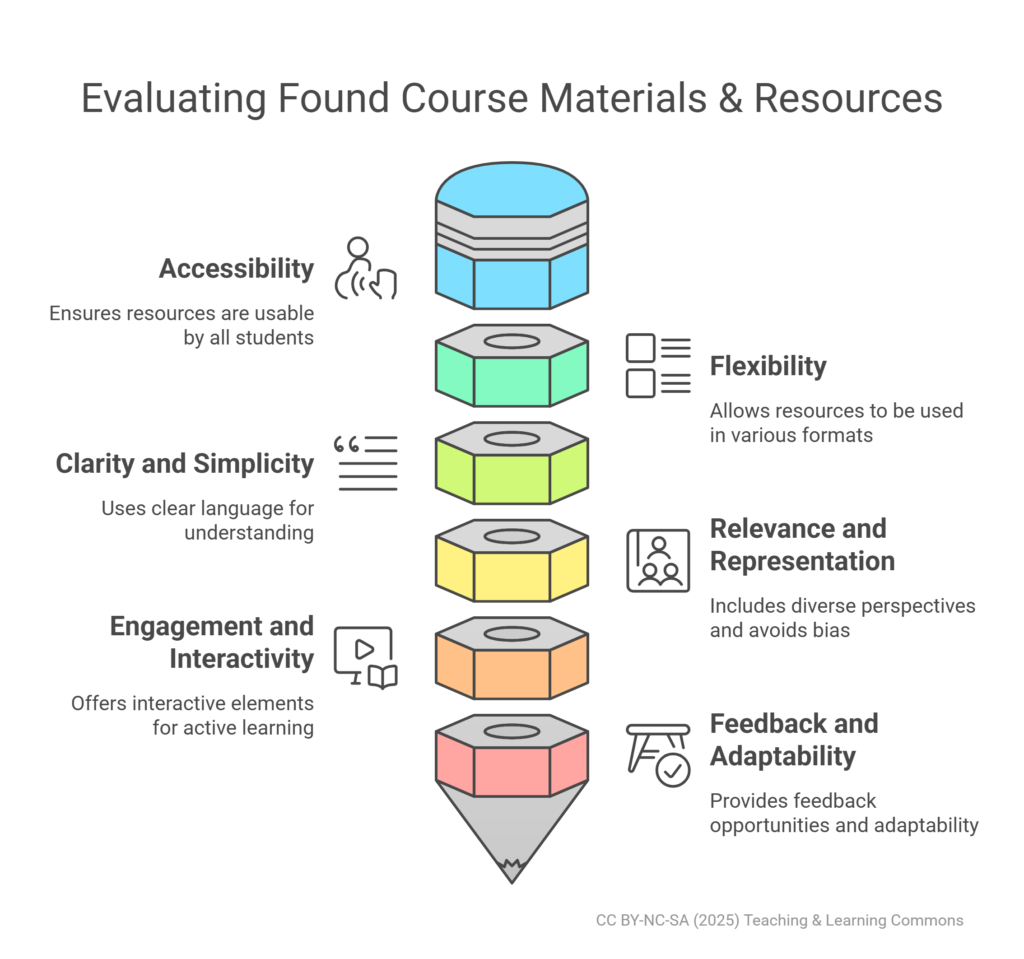
To design inclusive course materials, instructors should consider the following strategies:
A. Use of Accessible Formats
Course materials should be provided in formats that are accessible to all students. For instance, digital documents should be compatible with screen readers. Videos should include captions or transcripts for deaf or hard-of-hearing students (Burgstahler, 2015; Edyburn, 2010)
B. Clear and Simple Language
Materials should be written in clear language to ensure they are understandable to all students, including those who may not speak English as their first language or those with learning disabilities (Burgstahler, 2015; Rose & Meyer, 2002)
C. Multimodal Presentation
Information should be presented in multiple modes, such as text, audio, visual, and interactive formats. This caters to different learning styles and preferences, and ensures that students can access the information in a way that suits them best (Rose & Gravel, 2010; Hall, Cohen, Vue, & Ganley, 2015)
D. Consideration of Cultural Diversity
Course materials should be culturally inclusive, taking into account the diverse backgrounds of students. This includes using diverse examples and case studies, and avoiding content that may be offensive or exclusionary to certain groups (Burgstahler, 2015; Gay, 2010)
E. Flexibility in Use
Materials should be flexible in use, allowing students to interact with them in different ways. For example, digital documents should allow for text to be enlarged, colors to be changed, or text to be read aloud (Burgstahler, 2015; Edyburn, 2010)
F. Regular Updates and Improvements
Instructors should regularly review and update course materials based on student feedback and advances in knowledge. This ensures that materials remain current, relevant, and responsive to students’ needs (Burgstahler, 2015; Rose & Meyer, 2002)
Active learning strategies, such as problem-solving exercises, case studies, and project-based learning, align well with UDL principles. These strategies engage students in higher-order thinking tasks and allow them to apply their knowledge in practical ways. They also provide multiple means of engagement, representation, and expression, catering to diverse learning preferences and needs (Basham & Marino, 2013). For more information, please see the following sections related to Active Learning, as well as the following resources: Active Learning (The Learning Centres), Chapter 3, “Develop Active Learning Strategies” (Preparing for the Canadian Classroom Pressbook).
Consider:
Interactive Activities: Include activities that require active student participation, such as group discussions, hands-on experiments, and role-playing scenarios (Prince, 2004; Basham & Marino, 2013)
Problem-Based Learning (PBL): Use real-world problems that students need to solve. This method encourages critical thinking and application of knowledge (Hmelo-Silver, 2004; Basham & Marino, 2013)
Personalized Learning Paths: Leverage learning management systems to create adaptive, personalized learning experiences that respond to individual student needs and progress (Rose & Meyer, 2002; Rose & Gravel, 2010a)
Course example:
In a biology course, students engage in problem-based learning. Weekly, they receive real-world cases related to current biomedical issues. Groups consist of students from diverse backgrounds and with varying expertise, ensuring a rich collaborative learning environment where everyone’s strengths are utilized (Basham & Marino, 2013).
Formative assessment techniques, such as quizzes, self-assessments, and peer feedback, can provide ongoing feedback and support adaptive learning paths. These techniques allow instructors to monitor student progress and adjust instruction accordingly. They also provide students with opportunities to reflect on their learning and understand their strengths and areas for improvement (CAST, 2018). Please see the section on Formative Assessments for more in-depth information.
Collaborative learning experiences, such as group projects and discussions, can foster social interaction and expose students to diverse perspectives. These experiences align with the UDL principle of providing multiple means of engagement. They also develop important skills, such as communication, teamwork, and problem-solving (Smith & Throne, 2007b).
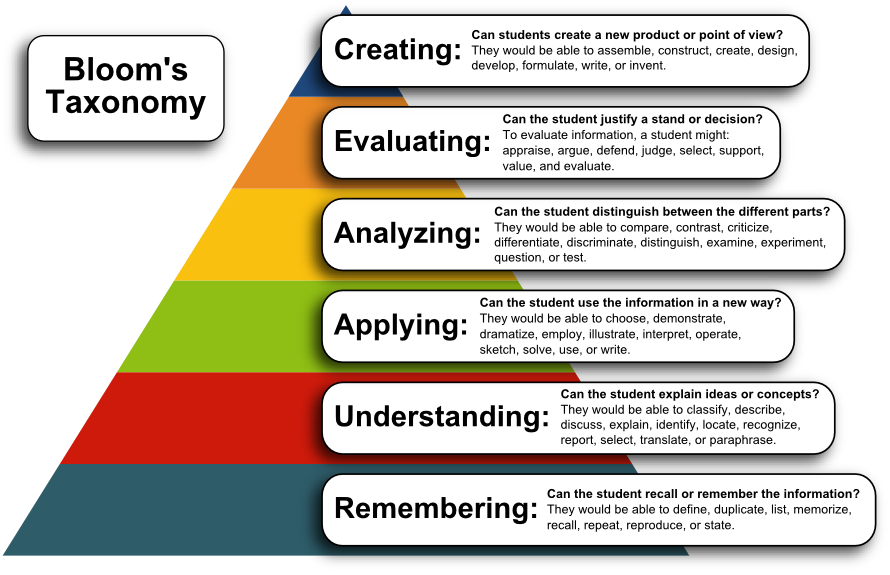
Together, they offer complementary frameworks that align well with UDL principles to enhance instructional activity design. While Bloom’s Taxonomy provides a hierarchical model of cognitive skills, Constructivist Learning Theory emphasizes active, student-centered learning where knowledge is constructed through experiences.
Leveraging Bloom’s Taxonomy
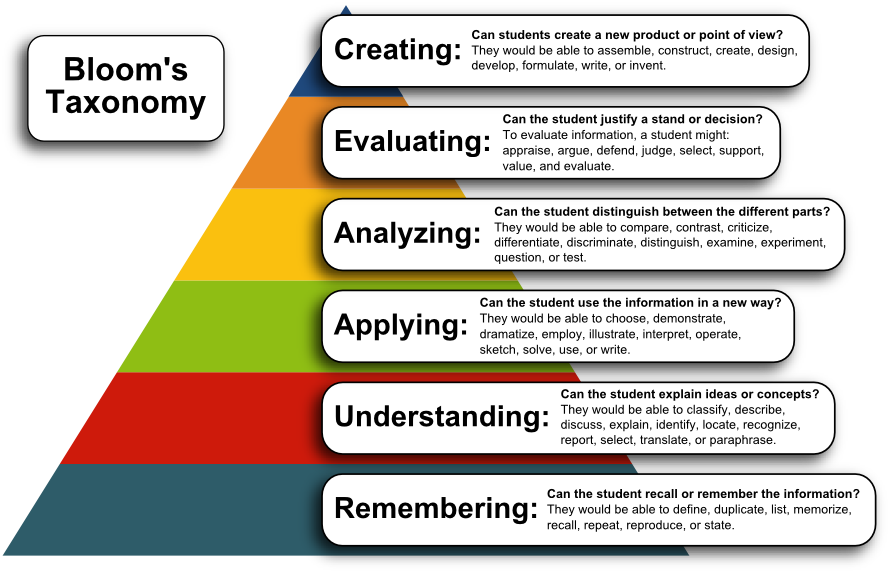
Instructors can design activities that cater to various cognitive levels of Bloom’s Taxonomy—remembering, understanding, applying, analyzing, evaluating, and creating. For example:
Remembering and Understanding: Have students create quiz questions based on their understanding of a topic. Questions should include a variety of styles and lengths such as multiple choice, true/false, short answer, answer based on an illustration, etc., to meet learner needs, but can also certainly stay within these lower order skills levels
Applying and Analyzing: Design project-based learning (PBL) tasks that require students to apply theoretical concepts to real-world scenarios. Encourage students to work in diverse groups to bring multiple perspectives
Evaluating and Creating: Facilitate activities like debates and peer reviews, which require critical thinking and reflection. Encourage the creation of multimedia projects like videos or podcasts, giving students the freedom to express their understanding in varied ways (Basham & Marino, 2013)
“Bloom’s Taxonomy” (April 2021) University of Victoria, Learning and Teaching Support and Innovation. Retrieved from https://teachanywhere.uvic.ca/teach-a-course/blooms-taxonomy/
Constructivist Learning Theory aligns closely with UDL by emphasizing active learning and social interaction. Some strategies include:
Collaborative Learning: Encourage group work and discussions, where students can build on their peers’ ideas. This fosters a deeper understanding through social interaction and perspective-taking (Smith & Throne, 2007b)
Problem-Based Learning (PBL): Create scenarios that require students to solve complex, real-world problems. These tasks should be open-ended to allow for multiple approaches and solutions, encouraging critical thinking and creativity (Basham & Marino, 2013)
Experiential Learning: Include hands-on activities and labs where students can engage directly with materials and concepts. Reflection components such as journals or ePortfolios can help students process their learning experiences
Applying UDL principles in instructional activities design involves creating flexible, inclusive, and engaging learning experiences that cater to the diverse needs of all students. It’s a dynamic process that requires thoughtful planning, implementation, and evaluation. However, the benefits of this approach, including enhanced accessibility, inclusivity, and student engagement, which far outweighs potential challenges.
Integrating Universal Design for Learning (UDL) principles into lesson planning is essential for creating inclusive and effective learning environments in higher education. UDL emphasizes flexibility in representation, engagement, and expression to accommodate the diverse needs of all learners. This subsection will explore practical strategies and structured frameworks that instructors can use to integrate UDL into their lesson planning.
Regardless of the model or framework used for lesson planning, the end result of effective, quality, and inclusive education for all students is achievable through integrating the principles of UDL. To support multiple means of representation, instructors should use varied and accessible instructional materials. For action and expression, diverse assessment options and assistive technologies can help students demonstrate their understanding. Enhancing engagement through choice, relevance, and real-world connections can further motivate and involve students.
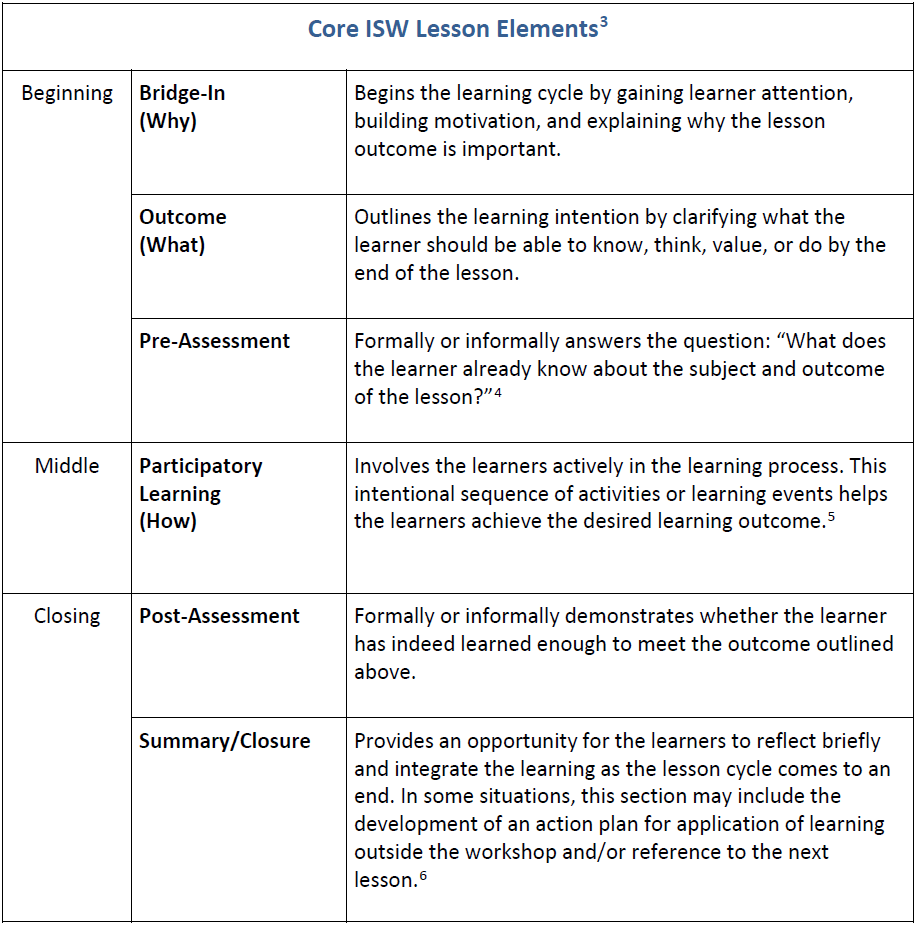
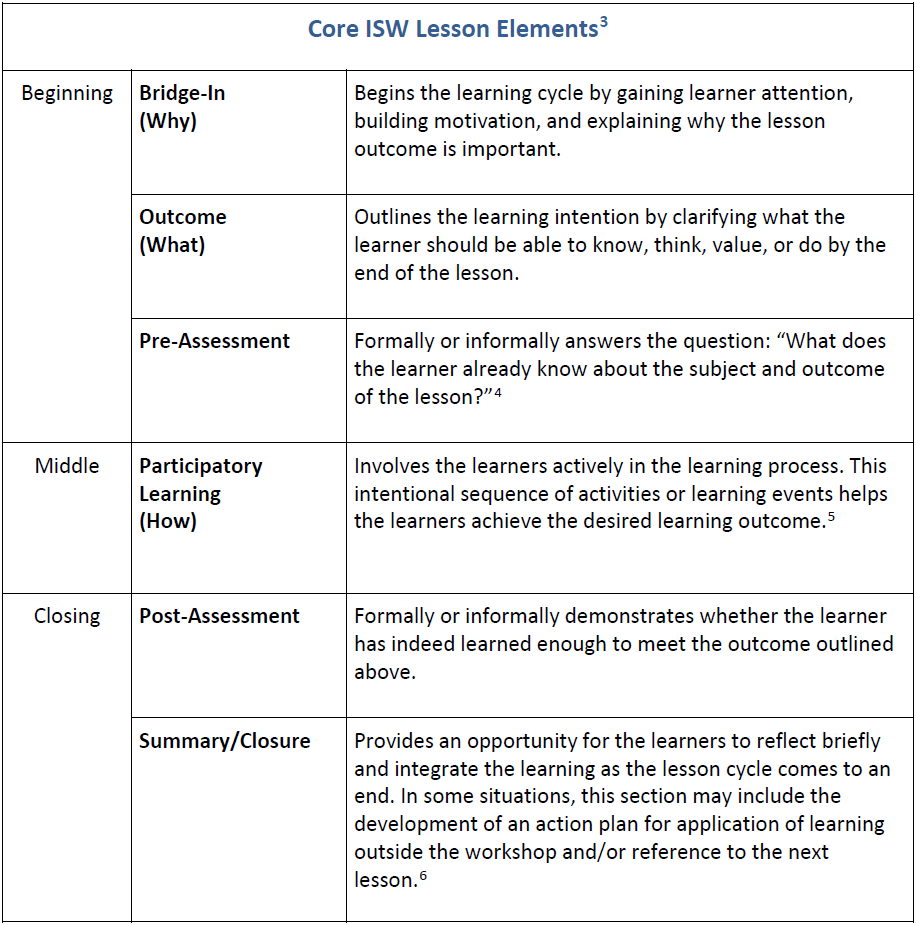
One approach that an instructor could take to designing their Instructional Activity is the BOPPPS model. The BOPPPS model, an acronym for Bridge-in, Objectives, Pre-assessment, Participatory Learning, Post-assessment, and Summary, is a comprehensive lesson planning model that ensures instructional activities are aligned and purposeful.
“Bridge-in,” which serves as an engaging introduction that connects learners’ prior knowledge to the new material
This is followed by clear and measurable “Objectives” that outline what the learners will be able to do by the end of the lesson
“Pre-assessment” allows instructors to gauge learners’ existing knowledge and skills, which can inform instructional strategies and ensure that the lesson meets learners where they’re at and their needs
“Participatory Learning” involves learners in active engagement with the material, promoting deeper understanding and retention.
“Post-assessment” provides an opportunity to measure whether the lesson’s objectives have been met
“Summary” reinforces key points and helps learners consolidate their new knowledge
CC-BY-NC-ND (2021), Part One: Workshop Overview, pg. 16. Instructional Skills Workshop Network Executive. (April 2021). The Instructional Skills Workshop (ISW) Handbook Part One: Workshop Overview, Part Two: Workbook, and Part Three: Further Information & Resources.
To download a table version of these bullet points, please download:
The BOPPPS model aligns well as a framework in supporting the principles of Universal Design for Learning (UDL), which emphasize flexibility in representation, engagement, and expression to accommodate diverse learners (CAST, 2018). For example, the “Bridge-in” can utilize multiple means of engagement by connecting new material to learners’ interests or experiences. The “Objectives” can be expressed in multiple ways to ensure all learners understand the goals of the lesson. “Participatory Learning” activities can offer multiple means of representation and expression, providing various ways for learners to interact with the material and demonstrate their learning.
To learn more about BOPPPS, we highly recommend the Instructional Skills Workshop (ISW). It is an instructor development program designed to enhance the teaching effectiveness of both new and experienced educators. For more information on ISW, please click the button below:
Another effective approach for designing instructional activities is the 4MAT Model, developed by Bernice McCarthy in 1980. This model is based on the understanding that people have different learning styles, and it includes four distinct phases (McCarthy, 1980):
Why?: Engage learners by explaining the relevance of the content. This phase connects the material to learners’ interests and experiences, fostering motivation and curiosity.
What?: Present the content and concepts. This phase involves delivering the core information in a clear and structured manner, ensuring that all learners can grasp the essential ideas.
How?: Allow learners to practice and apply the content. This phase includes hands-on activities, discussions, and exercises that help learners internalize and apply what they have learned.
If?: Encourage learners to extend and adapt the content to new situations. This phase promotes critical thinking and problem-solving by challenging learners to use their new knowledge in different contexts.
“The Complete 4MAT Model” by 4MAT System (2023). Retrieved from https://4mat4learning.com.au/what-is-4mat/
The 4MAT Model aligns well with the principles of Universal Design for Learning (UDL), which emphasize flexibility in representation, engagement, and expression to accommodate diverse learners (CAST, 2018). For example, the “Why?” phase can utilize multiple means of engagement by connecting new material to learners’ interests or experiences. The “What?” phase can present information in various formats to ensure accessibility. The “How?” phase can offer multiple means of representation and expression, providing various ways for learners to interact with the material and demonstrate their learning. Finally, the “If?” phase encourages learners to apply their knowledge in new and meaningful ways, supporting deeper understanding and retention.
The following considerations are, in general, educational practices you should engage in anyway throughout the course, but are also certainly applicable when planning out your lessons.
When planning lessons, the focus is on the overall structure and flow of the lesson. Key UDL considerations include:
Learning Goals: Clearly define what you want students to achieve by the end of the lesson. Ensure these goals are accessible and understandable for all students
Assessment Alignment: Plan assessments that align with your learning goals and provide multiple ways for students to demonstrate their understanding
Content Delivery: Consider how you will present the content in varied and accessible ways to cater to different learning preferences
Engagement Strategies: Plan for ways to engage students throughout the lesson, including opportunities for choice, relevance, and real-world connections
Scaffolding: Outline how you will provide support and gradually release responsibility to students, ensuring they can build on their knowledge and skills
Educational technology refers to a wide range of tools and resources that can facilitate learning and improve the educational experience for all students, regardless of their individual needs and learning styles. When thoughtfully integrated, these technologies can enhance the accessibility, engagement, and effectiveness of instructional activities, including assessments, learning tasks, teaching methods, and course materials (Rose & Meyer, 2002). The integration of educational technology in instructional design is a critical component in fostering an inclusive and engaging learning environment. It aligns with the principles of UDL by providing multiple means of representation, action and expression, and engagement (Rose & Meyer, 2002).
Interactive platforms like H5P (creating interactive content) and Zoom (real-time collaboration) are great additions to your lessons and can enhance active learning by aligning with students’ interests and goals (Mayer, 2008). Tech-enhanced classrooms support simultaneous in-person and virtual participation, increasing flexibility and inclusion. These tools simulate real-world scenarios, providing experiential learning opportunities beyond traditional classes (CAST, 2018).
Advanced tools such as the lightboard studio can make complex concepts exciting and visually engaging. Virtual and augmented reality (VR/AR) elevate learning by making abstract concepts tangible (e.g., historical sites or the human body), while platforms like Zoom and Mattermost improve collaborative efforts (Mayer, 2008). VR and AR combine real-world contexts with gamification (points, badges, leaderboards), sustaining student interest and enhancing enjoyment (Johnson et al., 2014).
Collaborative tools (e.g., Microsoft Teams, Zoom) support teamwork and problem-solving in group projects, aligning with UDL guidelines by offering diverse means of engagement, action, and expression (CAST, 2018). These technologies promote inclusive, productive learning environments by facilitating efficient idea and resource sharing.
The below image is taken from our Learning Technologies Ecosystem Word Press site, where you can explore the tools, organized by its functionality and A-Z, in support of course and instructional design. Clicking the image below will take you to the site, or alternatively click the “Visit Site” button underneath.
Video recording tools (e.g., Kaltura) support flipped classrooms, freeing up in-class time for discussions and hands-on activities. This model, offering content in various formats (text, video, interactive media), caters to diverse learning preferences. Flipped classrooms align with UDL by providing multiple representation and engagement means, with classroom time dedicated to student-centered activities tailoring each learner’s needs (Rose & Meyer, 2002). Creating high-quality educational videos involves multimedia principles like segmentation, signaling, and dual-channel processing, ensuring content is engaging and digestible (Clark & Mayer, 2016).
Balancing asynchronous (video lectures) and synchronous (interactive discussions) technologies in flipped classrooms maximizes flexibility and caters to varying learning styles. Multimedia lectures recorded in tech-enhanced classrooms provide rich, inclusive learning. Tools like Zoom or Microsoft Teams facilitate remote, hands-on activities through real-time collaboration and feedback, supporting synchronous learning and creating interactive environments (Rose & Meyer, 2002).
Electronic textbooks made with Pressbooks and resources with accessibility features (adjustable text size, text-to-speech, multimedia content) cater to diverse needs. Recorded sessions (lightboard, recording, podcast studios) serve as supplementary materials for different learning styles. Tools like Moodle (interactive content) and Hypothesis (annotations) customize and reformat content to student needs, promoting engagement and accessibility (CAST, 2018). Adhering to accessibility standards like WCAG is essential for inclusivity, ensuring resources are available to all, including students with disabilities (CAST, 2018). Features such as customizable text sizes, text-to-speech functions, and multimedia elements enhance interaction, benefiting students with reading difficulties or visual impairments (Johnson et al., 2014).
Open Educational Resources (OERs) expand access and reduce costs, aligning with UDL principles by making education affordable (He et al., 2020). Interactive features in digital textbooks (quizzes, annotations) transform passive reading into active learning, engaging students meaningfully (Johnson et al., 2014). Instructors can leverage the lightboard studio for blended lecture content and the podcast or recording studios for engaging course-related audio. Padlet fosters collaborative visual boards, boosting student engagement and idea sharing.
Digital assessments, such as online quizzes and exams, offer diverse formats—text, audio, and visual—tailored to various learning styles and needs (Moodle, H5P, Respondus, Kahoot!). These platforms provide timely feedback and allow multiple attempts, enhancing engagement and supporting multiple learning styles through formats like multiple-choice, short answer, essays, and interactive simulations.
Beyond traditional assessments, students can utilize digital portfolios (e.g., PebblePad, Padlet), multimedia presentations (e.g., Kaltura Capture, WordPress, H5P), and online discussions (Hypothesis) to express their understanding in their preferred formats. Automated grading systems deliver consistent feedback, aiding in the identification of improvement areas (Pardo & Siemens, 2014). Adaptive learning technologies, such as personalized quizzes adjusting in difficulty with learner performance, offer bespoke assessments (Means et al., 2013). Digital assessments align with UDL by enabling students to demonstrate knowledge through varied representations (written, oral, interactive), with scaffolding and instant feedback maintaining engagement and motivation (Rose & Meyer, 2002).
The effective integration of educational technology into instructional design aligns seamlessly with Universal Design for Learning (UDL) principles. This approach offers diverse means of representation, engagement, and expression, catering to individual learning styles and fostering an inclusive environment where every student can succeed. Educational technology, including lightboard studios, recording studios, podcast studios, and tech-enhanced classrooms, can enhance learning through UDL principles. For example, case studies demonstrate how digital assessments have improved student engagement and outcomes (Rose & Meyer, 2002). These real-world examples help educators grasp the benefits and practical application of integrating technology with UDL principles. Data analytics plays a crucial role in refining the integration of educational technology, ensuring teaching methods remain effective and responsive to student needs (Pardo & Siemens, 2014).
Insights from data can guide educators in making informed decisions about instructional strategies and the technologies used. Professional development opportunities, such as workshops and certification programs that focus on technologies like Kaltura, Pressbooks, and PoodLL, equip educators with the necessary skills to implement these strategies effectively. Continuous learning and professional growth are essential for educators to stay updated with the latest tools and methodologies in educational technology. Click the button below to view current synchronous and asynchronous learning opportunities, including workshops, webinars, and courses.
By adopting a continuous improvement approach, the integration of educational technology with UDL can create a more inclusive and engaging learning environment. This iterative process ensures educational practices evolve to meet changing student needs, promoting lifelong learning and success.
UDLing into Practice
Scenario 1
Self-Reflection & Application
Reflect on a course you have previously taught or are planning to teach within your discipline. Using what you have learned about UDL and instructional activities, consider your own – what are you currently doing that supports the principles of UDL? What new ideas and strategies are you planning on integrating going forward? What celebrations and challenges do you anticipate, and how will you address them? How will you ensure that all students, regardless of their individual needs and learning styles, have equitable access to learning and engagement opportunities?
Scenario 2
Designing Instructional Activities for a New Course
As a seasoned instructor in your discipline, you have been given the exciting opportunity to design a new course for the upcoming semester. Your task is to ensure that the course integrates a variety of instructional activities and accommodates the diverse needs of learners. Consider how you would approach course design to integrate multiple means of engagement, representation, and action and expression. What strategies and tools would you employ to create a dynamic and inclusive learning environment? Outline your plan, focusing on specific instructional activities, varied learning methodologies, and the integration of educational technology to enhance accessibility and motivation.
Scenario 3
Modernizing Instructional Activities within an Old Course
You have been tasked with evaluating an old course within your discipline that has not been updated in over 20 years. As an advocate for UDL, your goal is to modernize the course to make it more inclusive and effective for today’s diverse student population. The course is currently very text heavy, specifies lectures and readings, along with essays and exams as a part of the design. How can you integrate educational technology, such as interactive platforms, video recording tools, and adaptive learning technologies, to update the course? In what ways can you add variability and flexibility to the course? Provide specific examples of how you can integrate the principles of UDL to create a more inclusive and engaging learning experience.
UDL Your Instructional Materials
When designing courses that align with Universal Design for Learning (UDL) principles, careful consideration should be given to the acquisition of course materials and resources. This involves not only finding materials that are accessible and inclusive but also evaluating their effectiveness against UDL principles to ensure they meet the diverse needs of students. The following sections discuss strategies for finding and evaluating course materials to support UDL in higher education.
When designing courses that align with Universal Design for Learning (UDL) principles, careful consideration should be given to the acquisition of course materials and resources. This involves not only finding materials that are accessible and inclusive but also evaluating their effectiveness against UDL principles to ensure they meet the diverse needs of students.
In the process of resource acquisition, it’s important to integrate technology and consider legal and ethical aspects. The use of digital platforms and tools can streamline the search process, provide access to a wider range of resources, and offer features that aid in evaluating resource accessibility and alignment with UDL principles (Burgstahler, 2015; Bell & Shank, 2004). Furthermore, instructors should ensure that they have the necessary permissions to use and adapt the resources they find, respecting the intellectual property rights of resource creators and adhering to the terms of use for digital platforms and databases (Cox & Trotter, 2017). Here are some practical suggestions and strategies for finding course materials and resources:
Diverse Sources
Instructors should seek materials from a variety of sources such as academic databases, professional organizations, and multimedia repositories. Utilizing diverse sources ensures that the materials reflect a range of perspectives and modalities, which is critical for addressing the varied needs of learners (Vaughan et al., 2013; CAST, 2018)
Open Educational Resources (OERs)
While a separate section will delve deeper into OER, it’s important to note that OER repositories can offer customizable and inclusive resources that align with UDL principles (Cox & Trotter, 2017)
Collaborate with Librarians and Instructional Designers
University librarians and instructional designers possess valuable knowledge about accessible and inclusive course materials. Engaging with these professionals can provide insights and access to curated lists of UDL-aligned resources (Bell & Shank, 2004; Hall et al., 2015)
Professional Networks and Conferences
Engaging with professional networks and attending relevant conferences can help instructors discover new and innovative resources. These venues often introduce emerging technologies and tools that enhance accessibility and inclusivity in course content (Wenger, 1998)
Leveraging Colleagues and Department-Based Resources
Colleagues and department-based resources can often be a treasure trove of valuable materials. Sharing and discussing resources within departments can foster a collaborative environment and ensure that materials reflect discipline-specific best practices (Hutchings, 1996)
Discipline-Specific Considerations
Finding resources that align with the specific discipline’s requirements is crucial. Consider the unique needs and methodologies of the discipline when selecting materials to ensure they are relevant and align with UDL principles (Fox & Hendrickson, 1997)
User-Generated Content
Encouraging students to contribute to course materials by creating and sharing their own resources can help diversify and enrich the learning materials. This practice ensures that materials are relevant and can address the unique perspectives of the student cohort (Hodgkinson-Williams & Gray, 2009)
Adopting UDL principles in resource acquisition is not a one-time task, but an ongoing process. Instructors should regularly reassess their resource acquisition strategies and make necessary adjustments based on student feedback and evolving best practices in the field. This includes staying updated on new technologies and resources, as well as continuously evaluating the effectiveness of current resources in meeting the diverse needs of students (CAST, 2018).
After identifying potential resources, it’s essential to evaluate them against the principles of UDL. This ensures that the materials not only align with the course objectives but also effectively support the diverse learning needs of all students. The evaluation process involves assessing various aspects of the resources, including their accessibility, flexibility, clarity, relevance, and engagement. Additionally, it’s important to consider the adaptability of the resources and their ethical implications. Here are some practical suggestions and strategies for finding course materials and resources:
The first step in evaluating a resource is to ensure it is accessible to all students. This involves checking compatibility with assistive technologies, such as screen readers, and ensuring that videos come with captions or transcripts. Utilizing tools like the Web Content Accessibility Guidelines (WCAG) can aid in this evaluation (Burgstahler, 2015)
Flexibility
Assess whether the materials can be used in various formats and accommodate multiple modes of representation. For instance, instructors should verify if textual content can be converted into audio or if visual information can be accompanied by descriptive text. Flexible resource design allows students to choose the mode that best suits their learning needs (Rose & Meyer, 2002)
Clarity and Simplicity
Ensure that the language used in the materials is clear and simple, making it understandable for students with diverse linguistic backgrounds and learning disabilities. This involves avoiding jargon and providing clear definitions for technical terms. Additionally, using plain language guidelines can improve comprehension (Burgstahler, 2015)
Relevance and Representation
It is crucial to evaluate whether the materials include diverse perspectives and avoid cultural biases. Instructors should seek examples and case studies representing different cultures and ensure that content is respectful and inclusive. Critical media literacy approaches can help assess the material’s cultural sensitivity and relevance (Gay, 2010)
Engagement and Interactivity
Good UDL-aligned resources should be informative and engaging. Evaluate whether the materials offer interactive elements such as quizzes, discussions, or hands-on application opportunities. Interactive elements help maintain student interest and encourage active learning. Techniques such as using Just-In-Time Teaching (JiTT) can gauge and enhance student engagement (Prince, 2004; Basham & Marino, 2013)
Feedback and Adaptability
Consider whether the materials allow for formative assessment and adaptability. Resources should provide opportunities for students to receive feedback and for instructors to tailor content based on student responses and needs. Adaptive learning technologies and formative assessment tools can be instrumental in this process (CAST, 2018)
Open Educational Resources (OERs) are teaching, learning, and research resources that are free of cost and access barriers, and which also carry legal permission for open use (Hewlett Foundation, 2013). They include any resource used to teach within the classroom, for example textbooks, curricula, syllabi, lecture notes, assignments, tests, projects, audio, video, and animation (UNESCO, 2012). The potential of OER lies in their openness – they are free to access, free to reuse, free to revise, free to remix, and free to redistribute (Wiley, 2013). The use and creation of OERs are crucial for supporting Universal Design for Learning (UDL) principles, as they provide inclusive, flexible, and accessible educational resources (Hilton, 2016).
From a UDL perspective, OERs provide a significant advantage in terms of resource acquisition. They offer flexibility and adaptability, supporting the UDL principles of multiple means of representation, engagement, and action & expression.
OERs come in various media formats (text, audio, video, interactive simulations), catering to different learning preferences. They can be adapted to meet diverse learning needs, offering a range of ways to present information and content. For instance, an OER textbook can be converted into an audiobook or a series of video lectures to cater to auditory and visual learners, respectively (Butcher, 2015). Additionally, since OERs are openly licensed, educators can translate materials into different languages, making them accessible to non-native speakers and international students. This flexibility ensures that all students have equal access to information in a format that is most comprehensible to them, thus upholding the UDL principle of multiple means of representation (Hilton, 2016).
KPU uses Pressbooks as an OER creation platform. Pressbooks provides the option for students to access the book online or to download it in alternative file formats that may suit their needs better (e.g Digital PDF with clickable links, Print PDF to obtain a physical copy, or EPUB for use on e-readers).
Multiple Means of Engagement
The open nature of OERs encourages active learning. Students are more engaged when they can interact with their learning materials, contribute to them, and see their work as part of a larger knowledge-building community. For example, an instructor can choose to adapt an OER which includes interactive quizzes and videos, catering to different engagement preferences within the learner cohort (Wiley, 2014). By using OERs, instructors can more readily provide options for engagement, fostering a learning environment that respects individual learner differences (CAST, 2011). A popular use of OERs for Open Pedagogy is to co-create an OER with students, bringing students into the publishing process and providing an opportunity for students to give back their knowledge to the community. This must be done with the full and informed consent of students, providing an option for students to decline to publish their work.
Multiple Means of Action and Expression
OERs empower learners to demonstrate their knowledge and skills in ways that align with their strengths, preferences, and cultural contexts, fostering inclusivity and creativity. Through customization and adaptation, OERs allow for diverse methods of action and expression, supporting the UDL principle of providing varied opportunities for students to communicate their understanding. For instance, students can adapt or remix OER materials into formats that align with their chosen mode of expression, such as creating infographics, videos, or interactive digital presentations based on their learning. This flexibility allows them to showcase their knowledge in nontraditional formats that may better highlight their unique abilities and strengths. Educators can also use OERs to create assessments that offer multiple options for students to demonstrate mastery. For example, rather than requiring all students to submit a written report, an OER-based project might allow students to choose between creating a podcast, writing an essay, or developing a visual storyboard. These alternatives encourage learners to take an active role in their education by selecting pathways that resonate with their individual goals and learning preferences. Additionally, OERs can facilitate scaffolded assignments where students progress from simpler to more complex tasks, leveraging OER tools like collaborative writing platforms or interactive simulations to guide their learning and expression. This approach enables learners to gradually build confidence and competence in their ability to convey understanding in varied and meaningful ways.
Sourcing and Creating OERs & UDL
When sourcing and creating teaching and learning resources and materials, educators should consider using OERs. They not only provide cost-effective solutions but also enrich the learning experience by aligning with UDL principles. Here are some strategies and considerations for sourcing and creating OERs:
Critically evaluate OERs for their alignment with course objectives and UDL principles. Modify these resources as necessary to ensure they provide multiple means of engagement, representation, and expression.
Collaborate with Colleagues
Engage with fellow educators to share and co-create OERs. Collaboration fosters the exchange of ideas to develop resources that are inclusive and cater to the diverse needs of students.
Integrate Student Feedback
Involve students in the process of evaluating and adapting OERs. Their feedback can provide valuable insights into how well the materials meet their needs, helping to continually refine and improve the resources.
Continuous Professional Development
Stay informed about the latest developments in OERs and UDL through professional development opportunities. Attend workshops, webinars, and conferences dedicated to open education and inclusive practices.
At any point in time though, you can always reach out to the Open Education Strategist, as well as KPU’s Library Support for Open Education.
In 2018, Kwantlen Polytechnic University (KPU) launched Canada’s first Zero Textbook Cost (ZTC) Initiative to reduce the financial burden on students by eliminating the need for costly textbooks. Through this initiative, KPU tracks courses that use of open educational resources (OER), library resources, and instructor-created materials (e.g., Moodle content) instead of paid textbooks. An average of 27% of course sections offered at KPU do not requiring students to pay for course materials. Since the start of this initiative, we have saved students over $13 million dollars and have continued to expand, offering several credential programs that can be completed entirely through ZTC courses.
We have recently added a Low Textbook Cost (LTC) designation to accompany the ZTC course designation. The LTC designation is for courses where total course material costs are $40 or less, recognizing that some courses are functionally unable to achieve ZTC but instructors have still done the work to lower costs as much as possible. By marking courses with low textbook costs, students are able to differentiate between course sections with $200 textbooks or $20 course packs.
ZTC and LTC course information is made available to students during registration so that they can make more informed choices about which sections may be best for them.
The ZTC initiative aligns with UDL principles in several ways:
Accessibility: By providing free access to educational materials, ZTC removes financial barriers, making education more accessible to all students, including those from diverse economic backgrounds
Flexibility: The use of OER allows instructors to adapt and customize materials to meet the varied needs of students, supporting multiple means of representation, engagement, and expression
Inclusivity: ZTC promotes an inclusive learning environment by ensuring that all students have equal access to high-quality educational resources, regardless of their financial situation
KPU’s ZTC Initiative exemplifies the principles of UDL by fostering an equitable, flexible, and inclusive educational experience for all students.
To learn more about ZTC and LTC, please click the button below:
Reflect on a course you have previously taught or are planning to teach within your discipline. Using your what you have learned about UDL and instructional materials, consider your own instructional materials process – how do you create them, find them, and implement into your lessons? How might you leverage OERs and the principles of Open Education and Pedagogy? What are you currently doing that supports the principles of UDL? What strategies and tools would you employ to ensure equitable access to learning and engagement opportunities for all students? What celebrations and challenges do you foresee, and how will you address them? Reflect on how these changes can enhance student engagement and success in your course.
Scenario 2
Modernizing Course Materials for an Old Course
You are tasked with updating an old, text-heavy course that relies heavily on traditional lectures and readings. Assess materials against UDL principles and identify areas where the materials are inaccessible or do not provide multiple means of representation. Consider the use of educational technology. Consider the use of Low Textbook Cost (LTC) or Zero Textbook Cost (ZTC) as an option for students. How can these changes support overall learner success and UDL? By modernizing the course, you will create a more inclusive and engaging learning environment that supports diverse learning needs and fosters student achievement.
Scenario 3
Identifying and Planning for Course Materials for New Course
As an instructor designing a new course, you want to ensure it integrates diverse instructional activities and accommodates the diverse needs of learners. How will you accomplish this in your course materials? What strategies and tools would you employ to create a dynamic and inclusive learning environment? Outline your plan, focusing on specific course materials, OERs, and the integration of educational technology to enhance accessibility and motivation. The intention of your approach is to foster overall learner success by promoting engagement, understanding, and practical application of knowledge through the inclusion of these new course materials.