Course Design
The place to start course design is your syllabus. The syllabus is not merely an administrative or a contractual document but is your real opportunity to connect with your students as learner. In the last section, we spent a considerable amount of detail focusing on developing a UDL friendly syllabus. In this section, lets focus on how UDL can transform your overall course design.
For a podcast-style audio overview of the entire Course Design section, please listen below (captioning available and transcript downloadable under the player):
We discussed UDL principles that reflects and respects the diverse backgrounds and experiences of all students in the last section. In designing the syllabus, we highlighted the importance of embracing cultural inclusivity, and how the format and presentation can resonate with a diverse student body. This is also the case when designing the course. This means developing a course that represents the varied cultural tapestry of the classroom. For instance, the course design could blend communal learning traditions, that invites contributions and mirrors the collective knowledge-building found in many cultures. By thoughtfully designing the course to be culturally inclusive, educators signal their commitment to valuing and integrating the rich array of cultural identities present in their classroom.
While course design is a larger topic, we start by addressing the how UDL can influence fundamentals of course design such ensuring constructive alignment between the outcomes, assessments and learning tasks, design elements based on course delivery modality and then developing a UDL friendly Moodle shell.
Understanding Course Design from a UDL-Focus
Overview
Universal Design for Learning (UDL)-focused constructive alignment is an approach that intertwines the principles of UDL with the foundational elements of constructive alignment to enhance educational equity and effectiveness. While constructive alignment ensures that learning outcomes, activities, and assessments are coherently structured to promote effective learning, integrating UDL into this framework takes it a step further by ensuring that these components are designed to accommodate the diverse needs of all learners. This approach emphasizes the importance of creating an inclusive learning environment where each student is given the opportunity to succeed through carefully planned and flexible educational practices. By aligning course components with UDL principles, educators can better support student engagement, comprehension, and expression, ultimately facilitating a more personalized and effective learning experience.
Constructive alignment (CA) is an intentional design setting out what is the intended concept for students to learn, the learning activities they will engage in, and the learning assessments that will allow them to demonstrate their learning. These three main components set out the “meat and potatoes” of a course and demonstrate how each component is interrelated to each other and works together for the ultimate goal of effective and successful student learning.
Think of constructive alignment as a stool with three legs. If one of the legs of the stool is misaligned, one cannot use it. Constructive Alignment (CA) hinges on the outcomes-based approach to course and lesson design. It is the process of aligning learning outcomes (LO) with assessments (A) and learning (L) activities designed to deliver a course or a lesson.
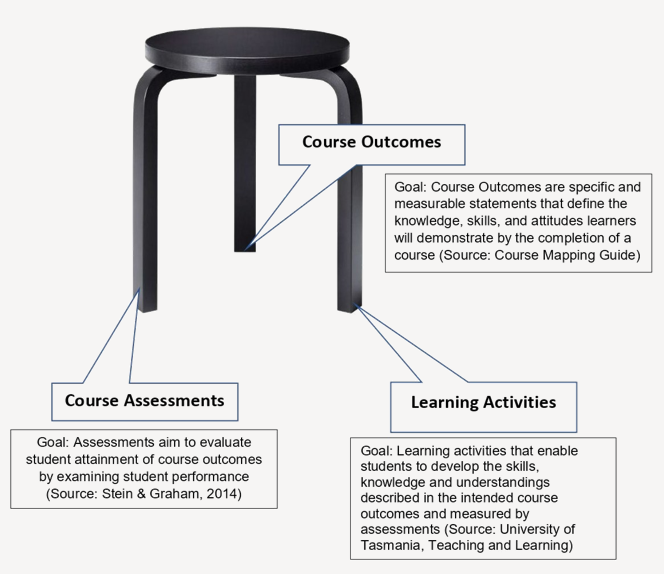
Constructive alignment arguably supports UDL initiatives as the emphasis is on ensuring that all students will find success in their learning and achieve the course learning outcomes:
Multiple Means of Engagement: Instructors can design learning activities that cater to different interests and learning styles.
- For instance, they could use real-world problems to engage students, or integrate collaborative activities like group projects or discussions.
- This not only aligns with the CA principle of aligning learning activities with learning outcomes, but also engages students in multiple ways.
Multiple Means of Representation: Instructors can present information in various formats to cater to different learning preferences.
- For example, they could use videos, diagrams, text, or hands-on demonstrations to explain a concept.
- This aligns with the CA principle of using varied teaching methods and supports the UDL principle of representing information in multiple ways.
Multiple Means of Action & Expression: Instructors can provide different ways for students to demonstrate their understanding.
- For example, instead of just traditional exams, they could allow students to create presentations, write essays, or develop a project.
- This aligns with the CA principle of aligning assessment tasks with learning outcomes and supports the UDL principle of allowing multiple means of action and expression.
next misalignment
Constructive alignment is a core principle in effective course design, ensuring that learning outcomes, teaching methods, and assessments are cohesively linked. When this alignment is absent or flawed, it results in constructive misalignment, which can negatively impact student learning and success. From a Universal Design for Learning (UDL) perspective, this misalignment can undermine the goal of creating an inclusive and supportive learning environment. For example, imagine a three-legged stool where one leg is missing or misaligned; it simply won’t stand. Similarly, a course without proper alignment fails to support all learners effectively.
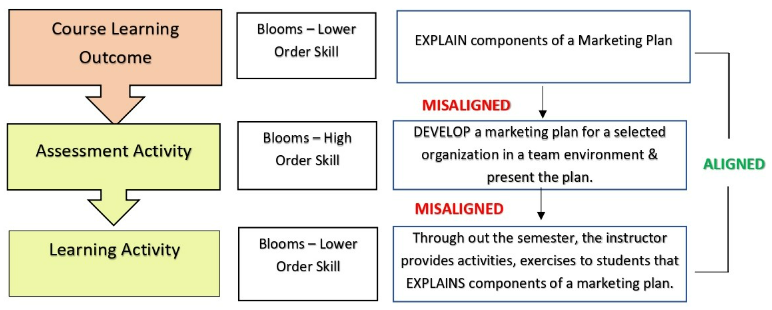
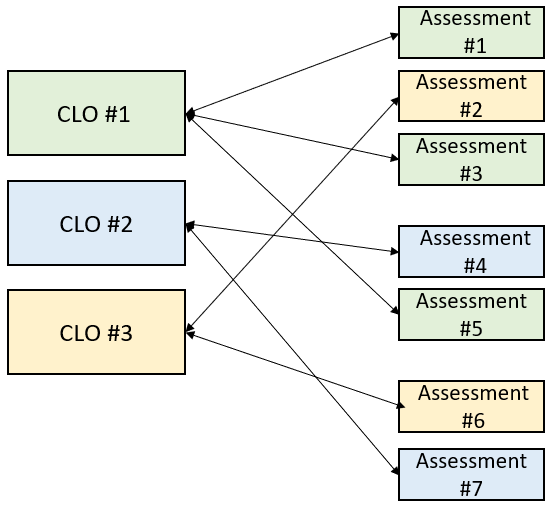
The course learning outcome is aligned with learning activities in relation to the complexity of the action verb. But, the assessment is not aligned with the learning outcome or the learning activity. Notice the assessment activity is requiring students to demonstrate a higher order skill that is outside the scope of the learning outcome or what was delivered in the lesson.
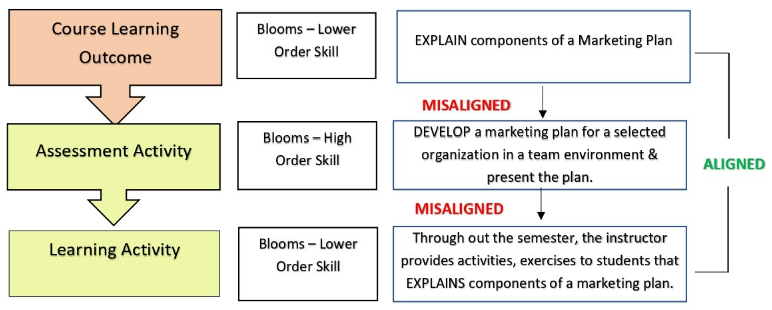
Constructive misalignments can significantly impact learners, particularly from a UDL perspective. These misalignments can manifest in various ways, disrupting the learning environment and potentially hindering student success. Here are some core impacts constructive misalignments can have on the learner:
Designing a course with constructive alignment in mind supports UDL principles by providing a structured framework that accommodates flexible and inclusive teaching strategies. Conversely, UDL supports constructive alignment by ensuring that varied and flexible teaching and assessment methods are inclusive and accessible to all learners, enhancing the effectiveness of constructively aligned course design. Ultimately, these approaches are two sides of the same coin, each reinforcing the other to create a more effective and inclusive learning environment.
The following section will focus more specifically on the importance of constructive alignment of assessment tasks and learning activities to CLOs.
next alignment
The design of UDL-aligned assessments begins with a clear understanding of the Course Learning Outcomes (CLOs). This understanding guides the integration of diagnostic assessments, which identify student needs and inform tailored instruction (Salvia & Ysseldyke, 2009). Constructive alignment ensures that assessments accurately measure student achievement related to CLOs (Biggs, 2003).
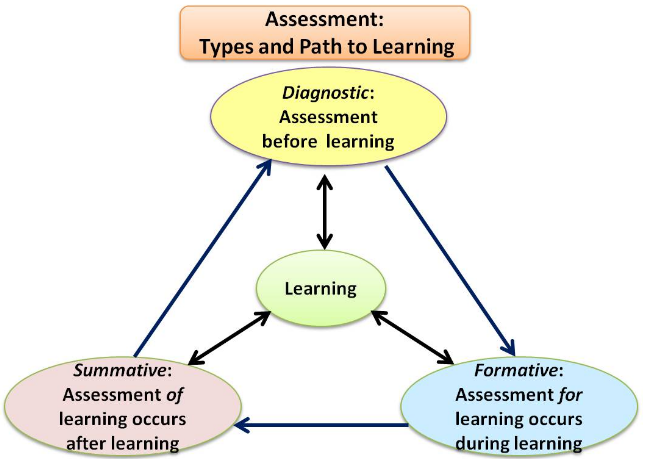
Diagnostic, formative, and summative assessments play roles in supporting learner variability and measuring progress. Authentic assessments and engagement evaluation are crucial, as they provide real-world relevance and maintain student interest. Regular use of formative assessments and involving students in self-assessment enhance reflection and metacognition (CAST, 2020). The iterative process of assessment design involves continuous feedback and revisions to ensure relevance and effectiveness (Nicol & Macfarlane‐Dick, 2006).
While designing the assessments, it’s important to integrate the three main principles of UDL – Representation, Action & Expression, and Engagement (CAST, 2018). This ensures that the assessments are accessible and fair to all students, regardless of their learning preferences or abilities. Adherence to these principles further builds student-centred learning by removing possible barriers and building in supports so that all students can find success and achieve the CLO.
While designing the assessments, it’s important to incorporate the three main principles of UDL – Representation, Action & Expression, and Engagement (CAST, 2018). This ensures that the assessments are accessible and fair to all students, regardless of their learning preferences or abilities. Adherence to these principles further builds student-centred learning by removing possible barriers and building in supports so that all students can find success and achieve the CLO.
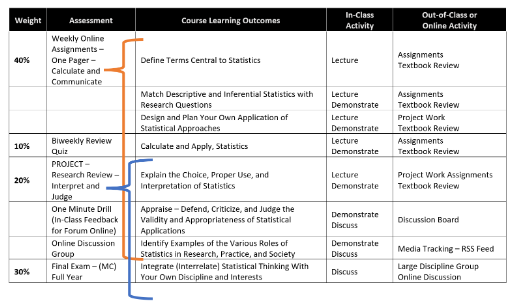
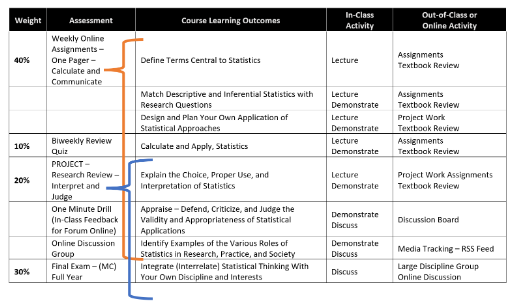
Authentic assessment opportunities should be provided where possible, and engagement is assessed alongside content knowledge. Strategies and supports are integrated to assist learners in overcoming challenges and engaging fully in the assessment process (CAST, 2020). Rubrics with clear expectations should be used for assessment, but also to guide student learning and self-assessment. Involving learners in the assessment of their own progress is a cornerstone of the UDL framework, fostering self-reflection and metacognition (CAST, 2020).
Assessments should be reviewed and revised regularly based on feedback, ensuring relevance and effectiveness in measuring the CLOs (Nicol & Macfarlane‐Dick, 2006). The assessment design process is also iterative, with summative assessments serving as a reflective tool to inform future design. Wenger, McDermott, & Snyder (2002) suggests establishing communities of practice among educators to help facilitate this reflective process and the continuous enhancement of assessment design. As Green (2014) states, “Assessment is at its most effective when it is an ongoing process rather than a one-time event” (p. 45). Regular feedback and adjustment are key to a successful assessment strategy.
next considerations
A significant thought for your course’s assessment design is the course modality – is it in-person, online, or Simultaneous Streaming? It is synchronous, asynchronous, or blended? Depending on your modality, you may find certain assessment types lend themselves to being more impactful than others. Consider for example, Dr. Gerstein’s (2012) experiential learning, flipped-classroom model that is grounded in UDL and in-line with Kolb’s Learning Cycle theory and model.
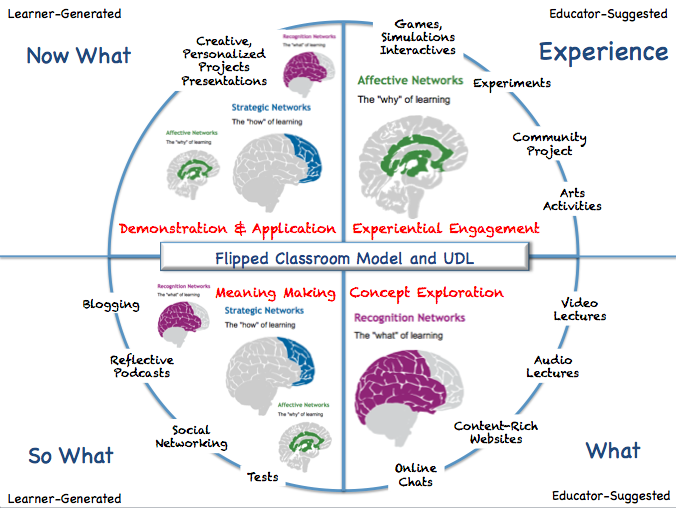
Starting in the upper right quadrant, Experience (educator-generated), and then moving clockwise through What (educator-generated), So What (learner-generated), and then Now What (learner-generated). Along the outer circumference of the circle are targeted, experiential learning-based, teaching and learning activities (TLAs), to support the intended learning:
- Experiential Engagement: This phase is about engaging the student on a personal level. It involves introducing learners to the lesson topic and content through sensory-rich, highly-engaging, hands-on, and authentic learning activities. The goal is to provide tasks that allow for active participation, exploration, and experimentation
- Concept Exploration: This phase is where videos and other multimedia are utilized to assist students in learning the theoretical concepts related to the content being covered. The aim is to present key concepts in one form of symbolic representation with an alternative form and provide visual diagrams, charts, notations of music or sound to support auditory content and information
- Meaning Making: In this phase, learners construct their own meanings and understanding of the experiences, content, and topics covered in the previous phases. They might do this via blogs, vodcasts, podcasts, Edmodo, wikis, and other web 2.0 tools that allow for personal reflection and expression
- Demonstration & Application: During this phase, learners demonstrate what they learned during the previous phases and how this learning will transfer to other areas of their lives. They compose in multiple media such as text, speech, drawing, illustration, design, film, music, dance/movement, visual art, sculpture, or video, etc.
As such, you can see how the core principles of UDL, multiple means of engagement, representation, and action & expression, can easily fit within each phase – and all towards the goal of supporting student learning and demonstration of that learning.
Synchronous learning occurs at a designated day and time as per the published course timetable and involves real-time interaction between instructors and students. This may include live-streamed lectures, discussions, or question and answer periods. If a course has synchronous components, students and instructors will need to be online during the scheduled days and times.
Asynchronous learning occurs within broadly defined timelines and does not require real-time interaction between instructors and students. If a course has asynchronous elements, students will be able to access the relevant course materials at any time but will still need to follow schedules of work and meet deadlines for activities and assignments. Asynchronous activities require students to be more self-directed in reading, watching videos, and completing activities online to achieve the course outcomes, which may feel unfamiliar for students accustomed to classroom-based learning.
next Design
Kwantlen Polytechnic University (KPU) uses Moodle as its primary learning management system (LMS) to support face-to-face (F2F) courses in addition to digital learning environments offered partially or fully online. KPU is committed to Universal Design for Learning (UDL) and it was specifically mentioned in KPU’s 2018 Academic Plan.
When designing a Moodle course, it’s important to apply the principles of Universal Design for Learning (UDL) to create an inclusive and accessible learning environment. However, the specific strategies and tools used may vary depending on the modality of the course. Whether the course is delivered synchronously online or in-person format, each modality presents unique opportunities and challenges. The following sections provide specific considerations for designing Moodle courses for each of these modalities, while maintaining a focus on flexibility, engagement, and responsiveness to meet the diverse needs of all students.
At Kwantlen Polytechnic University, you have access to one of five different templates for your Moodle course shell. While all of these pre-templated formats can help you with the organization and layout of your course, you might find one is particularly better suited to your needs than others. KPU’s Moodle installation is WCAG 2.1 AA compliant, though optimizing accessibility for students using Moodle is dependent on the approaches KPU instructors use when creating their courses, including the design of Moodle resources and activities, which directly impact the accessibility of individual courses.
This resource provides an overview of each Moodle template format, its alignment with Universal Design for Learning (UDL) principles, and some suggestions for addressing potential accessibility challenges to support faculty in the design of their Moodle course site(s).
Check out the following blog:
To download the Moodle Templates information, please click the button below.
next site elements
Moodle Site Features and Functionality Supporting UDL
There are a number of Moodle features and elements that can be leveraged within your course from a UDL-supported perspective. You may notice that a number of these practices and approaches are not specific to Moodle, but evidence-based instructional practices too:
- Formative Assessments: UDL encourages providing learners with different ways to express what they know. In Moodle, you can use the quiz activity or H5P activities to provide formative assessments that give students feedback on their learning progress (Centre for Teaching and Learning, n.d.). This aligns with the UDL principle of multiple means of action and expression.
- Personalized Learning Paths: UDL emphasizes the importance of meeting learners where they are – in Moodle, you can use the conditional activities feature to create personalized learning paths (Mezzanotte, 2022). This allows students to progress through the course based on their performance and understanding, aligning with all three UDL principles.
- Collaborative Learning: UDL encourages fostering community and collaboration. In Moodle, you can use the group work features to facilitate collaborative learning. This can enhance social interaction and peer learning, aligning with the UDL principle of multiple means of engagement (Fry, 2021a; Centre for Teaching and Learning, n.d.)
- Prompt and Constructive Feedback: UDL encourages providing timely and constructive feedback; in Moodle, you can use the grading and feedback features to provide students with prompt and constructive feedback (Fry, 2021a). This can help students understand their progress and what they need to improve, aligning with the UDL principle of multiple means of action and expression.
- Integrate Real-World Scenarios: UDL encourages making learning relevant and authentic. In Moodle, you can use the lesson module to create real-world scenarios that make learning more relevant and engaging (Fry, 2021a). This aligns with the UDL principle of multiple means of engagement.
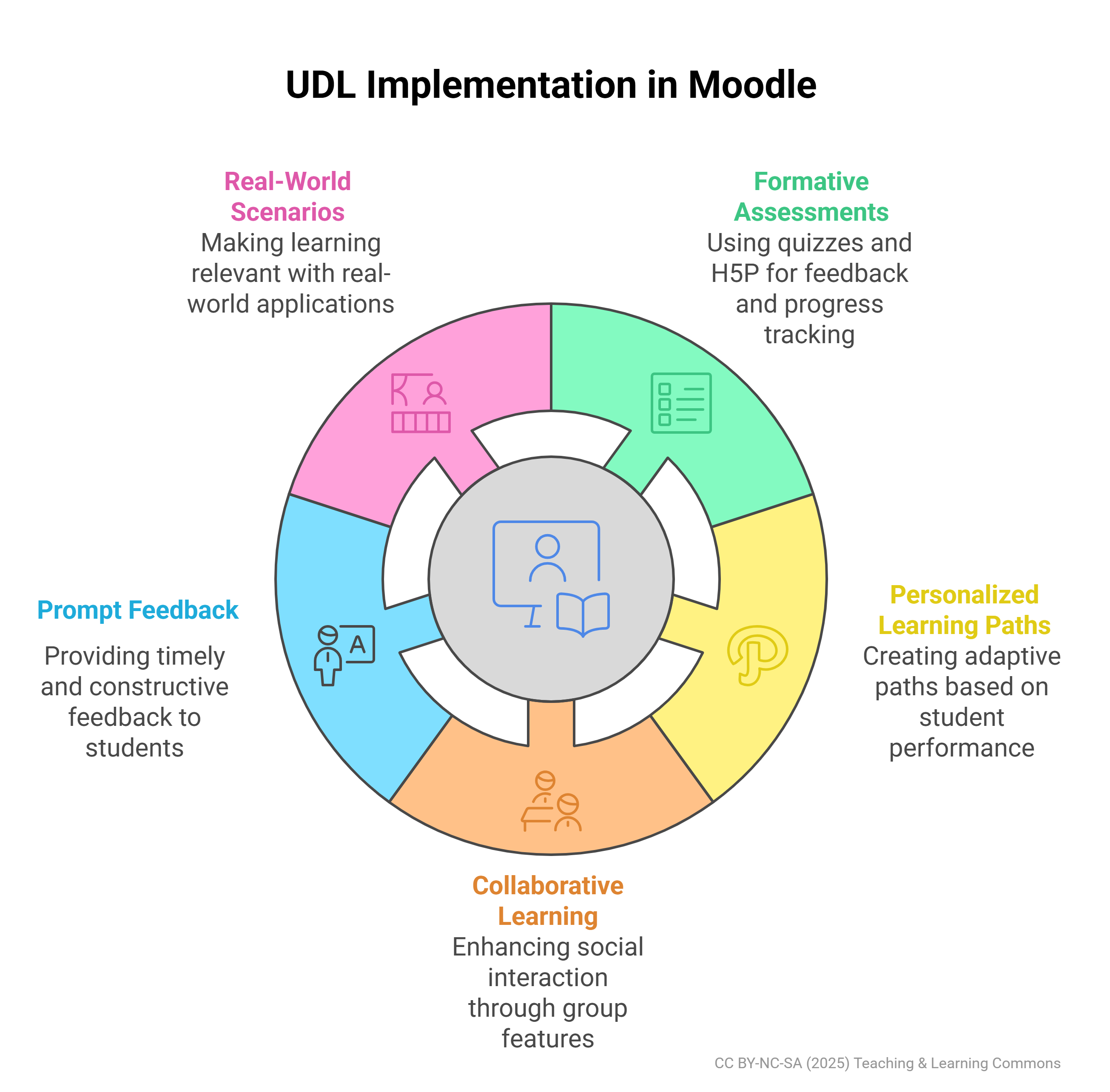
Here are the Moodle Activity and Resources tools available that you can use to support the design of your Moodle course shell.
Discipline-Specific UDL Moodle Considerations
Disciplines might leverage various Moodle capabilities to enhance learning experiences, aligning with UDL principles in different ways. Here are some examples:
next Accessible Design
Accessibility: UDL emphasizes the importance of making learning experiences accessible to all learners. In Moodle, this can be achieved by providing alt text for images, ensuring color contrast for visibility, and making sure all content is accessible with screen readers. This aligns with the UDL principle of multiple means of representation, which encourages presenting information in different ways.
- Flexible Content Presentation: UDL encourages presenting information in different ways. In Moodle, you can use multimedia capabilities to present content in multiple formats (text, video, audio, etc.). This caters to different learning preferences and abilities, aligning with the UDL principle of multiple means of representation (Fry, 2021b; Mezzanotte, 2022; Learning and Teaching Support and Innovation, 2023; Centre for Teaching and Learning, n.d.).
- Interactive Learning Activities: UDL emphasizes the importance of engaging learners in different ways. In Moodle, you can integrate interactive activities such as quizzes, forums, and wikis to engage students and cater to different learning styles (Fry, 2021a). This aligns with the UDL principle of multiple means of engagement.
- Clear Navigation and Structure: UDL emphasizes the importance of making information perceptible. In Moodle, ensuring your course has a clear and intuitive structure can help reduce cognitive load and make it easier for students to navigate the course (Fry, 2021b; Centre for Teaching and Learning, n.d.). This aligns with the UDL principle of multiple means of representation.
- Consistent Layout and Design: UDL encourages reducing unnecessary complexity. In Moodle, keeping the layout and design of your course consistent can help students know what to expect and where to find information (Mezzanotte, 2022; Centre for Teaching and Learning, n.d.). This aligns with the UDL principle of multiple means of representation.
Here are additional resources to support accessibility:
Technology Accessibility to Support Learning
This site includes guidance on Moodle, PebblePad, Media Creation, Conferencing Tools, Documents, and Design Considerations
See the specific section for Moodle
Ensuring Accessible Course Materials course
Focuses specifically on accessible design of course and materials
Accessibility Toolkit – 2nd Edition
Pressbook
Check for Success
As you strive to create an inclusive and supportive learning environment, it’s important to regularly reflect on and assess your course design for alignment with Universal Design for Learning (UDL) principles. Just as we provided some suggested rubrics for self-reflection on your syllabus design, this section is dedicated to helping you self-check and evaluate your course design to ensure it is UDL-friendly.
Additional Resources:
To assist you in this process, we provide two valuable resources that you can use: the UDL Progression Rubric and the UDL Implementation Rubric. These tools are designed to guide you in examining various aspects of your course, ensuring that they meet the diverse needs of all learners.
UDL Progression Rubric
Based on the CAST UDL Guidelines (2018), Katie Novak and Kristan Rodriguez (2018) developed the UDL Progression Rubric. The rubric uses the nine guidelines (3 for each Engagement, Representation, and Action & Expression) as criteria, uses “Emerging,” “Proficient,” and “Progressing Toward Expert Practice” as the scale, and outlines practices and strategies for implementing and aligning within UDL for the performance indicator language.
Here is the link to the rubric:
This rubric provides a great opportunity to critically reflect your course design from a UDL-perspective that focuses on supporting successful student learning.
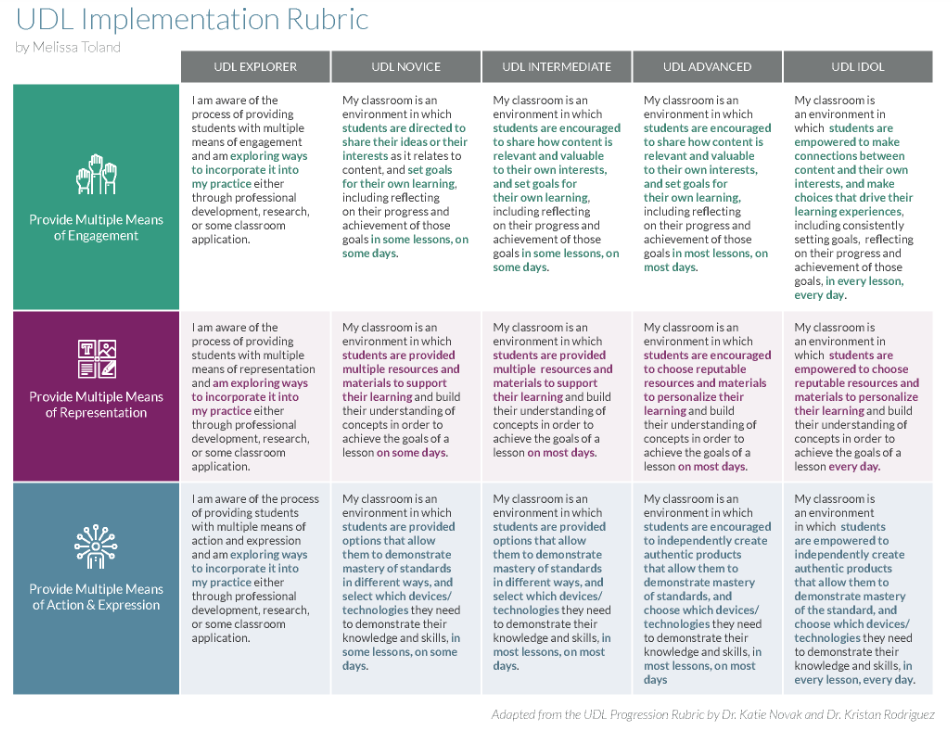
UDL Implementation Rubric
Based on the CAST’s UDL Progression Rubric, Melissa Toland (2019) developed the UDL Implementation Rubric – a more simplified and streamlined version. This rubric has three criteria to match the three principles, and then follows a 5-point scale for “UDL Explorer, UDL Novice, UDL Intermediate, UDL Advanced, and UDL Idol.” Each of the performance indicators are a bit more broad as a result and speaks more to an instructor’s teaching and learning philosophy in supporting and implementing UDL principles into their course.
UDLing into Practice
Scenario 1
Self-Reflection & Application
Reflecting on your own Moodle course shell, consider what you are currently doing to support Universal Design for Learning (UDL). Identify specific strategies you have implemented. Plan what you will include going forward to enhance your course further, leveraging features of Moodle and supporting the principles of UDL. Your goal is to ensure an inclusive, engaging, and effective learning environment that caters to the diverse needs of all learners.
Scenario 2
Modernizing an Old Moodle Course Shell
Consider a hypothetical course, within your disciple, that previously underutilized its Moodle shell, primarily just hosting links and attachments. Students found it difficult to engage with the content and lacked motivation. Your task is to modernize the course shell, making it more dynamic and interactive. Begin by evaluating the current setup, identifying areas where the course falls short in terms of engagement and accessibility. Develop a plan to integrate UDL principles, leveraging Moodle features for student success.
Scenario 3
Designing a New Moodle Course Shell
Imagine you have been asked to design a new Moodle course (within your discipline) shell and need to ensure the course integrates diverse instructional activities and accommodates the diverse needs of learners. What strategies and tools would you employ to create a dynamic and inclusive learning environment? How will you leverage the styles and features of Moodle to align with the principles of UDL in supporting your students? Outline your plan for success, providing specific details about which template and features you would recommend and why. The intention of your approach is to foster overall learner success by promoting engagement, understanding, and practical application of knowledge.